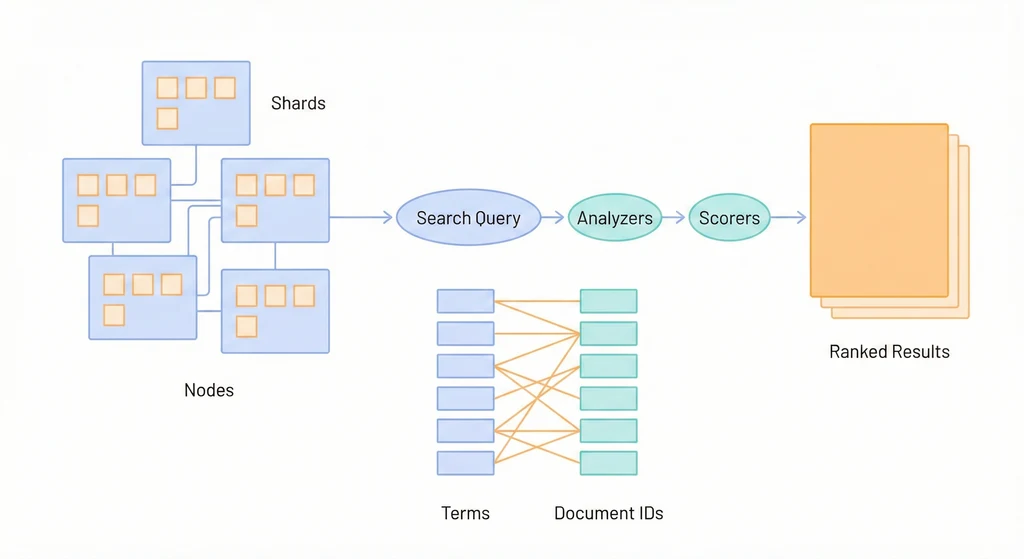
cover

Elasticsearch 深入:當 PostgreSQL FTS 不夠用

Log Management 介紹了用 EFK/ELK Stack 收集和搜尋日誌。但 Elasticsearch 不只是日誌搜尋引擎——它是一個通用的分散式搜尋與分析引擎。當你的應用需要複雜的全文搜尋、分面過濾、自動補全、模糊匹配,而 PostgreSQL 的 Full-Text Search 開始顯得力不從心時,就是考慮引入 Elasticsearch 的時機。

這篇文章聚焦在 Elasticsearch 作為應用搜尋引擎的角色:怎麼設計 Mapping、怎麼寫好的查詢、怎麼調校效能。和日誌用途不同,應用搜尋對 relevance(搜尋結果相關性)和 latency(回應時間)有更高的要求。

架構概覽

flowchart TD
    App["應用程式"] -->|Index 寫入| Coord["Coordinator Node\n路由請求"]
    App -->|Search 查詢| Coord

    Coord --> N1["Data Node 1"]
    Coord --> N2["Data Node 2"]
    Coord --> N3["Data Node 3"]

    subgraph Index["Index: products"]
        S0["Shard 0\nPrimary"] --> R0["Shard 0\nReplica"]
        S1["Shard 1\nPrimary"] --> R1["Shard 1\nReplica"]
        S2["Shard 2\nPrimary"] --> R2["Shard 2\nReplica"]
    end

    N1 --- S0
    N2 --- S1
    N3 --- S2
    N1 --- R1
    N2 --- R2
    N3 --- R0

什麼時候需要 Elasticsearch

PostgreSQL 進階 涵蓋了 PostgreSQL 的 Full-Text Search(tsvectortsqueryts_rank)。對很多應用來說,PostgreSQL FTS 已經夠用了——不需要額外部署和維護一套搜尋基礎設施。但以下場景會讓 PostgreSQL FTS 開始吃力:

  1. 模糊搜尋 / 容錯:使用者輸入 elasticserch(拼錯),PostgreSQL FTS 找不到任何結果。Elasticsearch 的 fuzziness 參數可以自動處理 1-2 個字元的拼寫錯誤,還是能找到 elasticsearch 相關的文件。

  2. 複雜分面搜尋(Faceted Search):電商網站的左側篩選欄——按品牌、價格區間、顏色、評分過濾,同時顯示每個篩選條件的數量。PostgreSQL 要寫很多 COUNT(*) ... GROUP BY 子查詢,效能隨篩選條件增加急劇下降。Elasticsearch 的 Aggregation 天生就是為這個設計的。

  3. 多語言自動偵測:你的平台有中文、英文、日文內容。PostgreSQL 的 FTS 需要在建立 tsvector 時指定語言配置,無法自動偵測。Elasticsearch 可以對同一個欄位套用多個 Analyzer,甚至用 language detection plugin 自動選擇。

  4. 大量文件(10M+):PostgreSQL FTS 在百萬級文件的全文搜尋已經需要仔細調校 GIN index,千萬級以上效能明顯下滑。Elasticsearch 天生分散式,可以水平擴展到數十個節點,輕鬆處理數十億文件。

  5. 高吞吐量的即時索引:每秒數千筆資料的即時索引需求(例如社群平台的貼文、即時庫存更新),PostgreSQL 的單一寫入節點會成為瓶頸。

  6. 複雜的相關性調校:搜尋結果的排序不只是「包含關鍵字」——需要考慮欄位權重、新鮮度、熱門度、使用者偏好。Elasticsearch 的 function_score 提供極大的彈性。

總結:如果搜尋只是你應用的一個小功能(「在我的 app 裡搜尋」),用 PostgreSQL FTS。如果搜尋就是你的核心功能(「搜尋就是我的 app」),用 Elasticsearch。

核心概念

在深入 Mapping 和查詢之前,先釐清 Elasticsearch 的基本概念。如果你來自關聯式資料庫的背景,這些對照會有幫助,但要注意它們不是完全等價的。

Index, Document, Field

Elasticsearch對應的 RDBMS 概念說明
IndexTable一組具有相同結構的文件集合
DocumentRow一筆資料,JSON 格式
FieldColumn文件中的一個欄位
MappingSchema欄位的型態與分析方式

看起來很像資料庫?但 Elasticsearch 不是資料庫。關鍵差異:

  • 沒有 Transaction:不支援 ACID。寫入後不保證立即可搜尋(有 1 秒的 refresh interval)。
  • Eventually Consistent:Replica 同步有延遲。讀到舊資料是正常的。
  • 不適合作為 Primary Data Store:Elasticsearch 不應該是資料的唯一來源。你的「真相」應該在 PostgreSQL 或其他 ACID 資料庫裡,Elasticsearch 是搜尋用的副本。

Shard & Replica

Elasticsearch 把一個 Index 的資料拆分成多個 Shard(分片),分散到不同的節點上。

Index: products (3 primary shards, 1 replica)
┌──────────────────────────────────────────────────┐
│ Node 1           Node 2           Node 3         │
│ ┌──────────┐    ┌──────────┐    ┌──────────┐    │
│ │ P0       │    │ P1       │    │ P2       │    │
│ │ (primary)│    │ (primary)│    │ (primary)│    │
│ ├──────────┤    ├──────────┤    ├──────────┤    │
│ │ R1       │    │ R2       │    │ R0       │    │
│ │ (replica)│    │ (replica)│    │ (replica)│    │
│ └──────────┘    └──────────┘    └──────────┘    │
└──────────────────────────────────────────────────┘
  • Primary Shard:資料的原始分片。Index 建立後,Primary Shard 的數量不能更改(除非 reindex)。
  • Replica Shard:Primary 的副本,提供讀取擴展和容錯。Replica 數量可以隨時調整。
  • Shard 大小建議:每個 Shard 10-50GB。太小(1000 個 1MB 的 shard)浪費資源,太大(一個 500GB 的 shard)恢復慢。
  • Over-sharding 是最常見的錯誤:很多人設定太多 shard(例如每個日期 index 都 5 個 shard),結果叢集有上萬個 shard,master node 管理開銷極大。一個小型應用,1-3 個 primary shard 就夠了。
# 建立 Index 時指定 shard 數量
curl -X PUT "localhost:9200/products" -H 'Content-Type: application/json' -d'
{
  "settings": {
    "number_of_shards": 3,
    "number_of_replicas": 1
  }
}'

Inverted Index(倒排索引)

Elasticsearch 之所以能做到毫秒級的全文搜尋,核心在於 Inverted Index。概念和書本的「索引頁」一樣——不是從頭到尾翻書找關鍵字,而是先查索引,直接翻到對應的頁碼。

假設有三筆文件:

Doc IDContent
1”Elasticsearch is fast”
2”PostgreSQL is reliable”
3”Elasticsearch is reliable and fast”

Inverted Index 長這樣:

TermDocument IDs
elasticsearch[1, 3]
fast[1, 3]
is[1, 2, 3]
postgresql[2]
reliable[2, 3]
and[3]

搜尋 elasticsearch fast 時,查找 elasticsearch → [1, 3],查找 fast → [1, 3],取交集 → [1, 3]。不需要掃描每筆文件。

但這也解釋了為什麼 Elasticsearch 的更新(update)成本高:修改一筆文件意味著要更新所有相關 term 的 inverted index。實際上 Elasticsearch 不會就地更新(in-place update),而是把舊文件標記為刪除、寫入一筆新文件,然後在背景做 merge。

Mapping 設計

Mapping 是 Elasticsearch 的 Schema——定義每個欄位的型態、分析方式。Mapping 設計的好壞直接影響搜尋品質和效能。

基本 Mapping

一個電商產品的 Mapping 範例:

PUT /products
{
  "settings": {
    "number_of_shards": 2,
    "number_of_replicas": 1
  },
  "mappings": {
    "properties": {
      "title": {
        "type": "text",
        "analyzer": "standard"
      },
      "title_keyword": {
        "type": "keyword"
      },
      "description": {
        "type": "text"
      },
      "category": {
        "type": "keyword"
      },
      "brand": {
        "type": "keyword"
      },
      "price": {
        "type": "float"
      },
      "in_stock": {
        "type": "boolean"
      },
      "created_at": {
        "type": "date",
        "format": "strict_date_optional_time||epoch_millis"
      },
      "tags": {
        "type": "keyword"
      },
      "rating": {
        "type": "float"
      },
      "sold_count": {
        "type": "integer"
      }
    }
  }
}

text vs keyword

這是 Mapping 設計中最核心的決策。搞混了就會出現「搜不到」或「效能很差」的問題。

textkeyword
是否分詞(Analyzed)是(經過 Tokenizer 拆分、Token Filter 處理)否(完整儲存,不拆分)
搜尋方式全文搜尋(match query)精確匹配(term query)、篩選、排序、聚合
範例欄位文章標題、文章內容、產品描述分類名稱、Email、訂單狀態、標籤
佔用空間較大(儲存 inverted index + 原始值)較小(只儲存原始值 + doc values)

常見的錯誤:

// 錯誤:把 category 設為 text
"category": { "type": "text" }
 
// 用 term query 篩選 category = "Electronics"
{ "term": { "category": "Electronics" } }
// 結果:找不到!因為 text 欄位經過 analyzer 處理,
// "Electronics" 被轉成小寫 "electronics" 儲存,
// 而 term query 是精確匹配,不會做小寫轉換。
// 正確:category 用 keyword 類型
"category": { "type": "keyword" }
// 或者用 term query 搜尋小寫值
{ "term": { "category": "electronics" } }

Dynamic Mapping 的陷阱

如果你不定義 Mapping 就直接寫入資料,Elasticsearch 會自動偵測欄位類型(Dynamic Mapping)。聽起來很方便,但在 production 環境是個地雷:

  • 字串自動偵測:所有字串都會被同時建立 textkeyword 子欄位,浪費空間。
  • 數字字串被偵測為 text:JSON 裡的 "price": "99.99"(字串)會被當成 text,無法做數值範圍查詢。
  • 日期格式不一致:第一筆資料的 created_at 如果是 "2024-01-01",ES 偵測為 date。但如果第二筆是 "yesterday",就會報錯。
  • Mapping explosion:如果你的 JSON 文件有動態的 key(例如 {"user_123": {...}, "user_456": {...}}),每個 key 都會建立一個欄位,可能產生數萬個欄位,拖垮叢集。

建議:production 環境永遠使用明確的 Mapping,並且關閉 dynamic mapping 或設為 strict:

PUT /products
{
  "mappings": {
    "dynamic": "strict",
    "properties": {
      "title": { "type": "text" },
      "category": { "type": "keyword" },
      "price": { "type": "float" }
    }
  }
}

設為 "strict" 後,寫入未定義的欄位會直接報錯,而不是默默建立新欄位。

Multi-field Mapping

同一個欄位常常有多種搜尋需求。例如 title

  • 全文搜尋需要 text 類型
  • 排序和聚合需要 keyword 類型
  • 自動補全需要 edge_ngram 分詞

Multi-field mapping 讓你一個欄位同時滿足多種需求:

{
  "mappings": {
    "properties": {
      "title": {
        "type": "text",
        "analyzer": "standard",
        "fields": {
          "keyword": {
            "type": "keyword",
            "ignore_above": 256
          },
          "autocomplete": {
            "type": "text",
            "analyzer": "autocomplete_analyzer",
            "search_analyzer": "standard"
          }
        }
      }
    }
  }
}

使用方式:

// 全文搜尋
{ "match": { "title": "wireless headphones" } }
 
// 精確排序
{ "sort": [{ "title.keyword": "asc" }] }
 
// 自動補全
{ "match": { "title.autocomplete": "wire" } }

注意 autocomplete 子欄位用了不同的 search_analyzer。這是因為 index 時需要用 edge_ngram 產生 prefix token(w, wi, wir, wire…),但搜尋時應該用 standard analyzer 直接匹配,否則搜尋 wire 也會被拆成 w, wi, wir, wire,導致結果太多。

Analyzer 深入

Analyzer 決定了 text 欄位如何被分詞和處理。搜尋品質的好壞很大程度取決於 Analyzer 的選擇。

Analyzer 的三個階段

原始文字 → [Character Filter] → [Tokenizer] → [Token Filter] → Terms
  1. Character Filter:在分詞之前對原始文字做字元級別的處理(例如移除 HTML 標籤、將 & 轉為 and)。
  2. Tokenizer:把文字拆分成 Token(例如按空白分割、按語言規則分詞)。
  3. Token Filter:對每個 Token 做進一步處理(例如轉小寫、移除停用詞、詞幹提取 stemming)。

standard analyzer 為例:

輸入: "The Quick Brown Fox Jumps!"
Character Filter: (無)
Tokenizer (standard): ["The", "Quick", "Brown", "Fox", "Jumps"]
Token Filter (lowercase): ["the", "quick", "brown", "fox", "jumps"]

內建 Analyzer

Analyzer說明適用場景
standardUnicode 分詞 + 小寫轉換通用,大多數西方語言
simple按非字母字元分割 + 小寫簡單的文字搜尋
whitespace只按空白分割,不做其他處理需要保留大小寫和標點的場景
englishStandard + 英文停用詞 + 英文 stemming英文內容(running → run)
keyword不做任何分詞,整個值作為一個 term不需要分詞但需要 text 功能時

Custom Analyzer 範例:自動補全

自動補全(Autocomplete)是搜尋引擎最常見的功能。使用者輸入幾個字,下拉選單即時顯示建議。實作方式是用 edge_ngram tokenizer:

PUT /products
{
  "settings": {
    "analysis": {
      "analyzer": {
        "autocomplete_analyzer": {
          "type": "custom",
          "tokenizer": "autocomplete_tokenizer",
          "filter": ["lowercase"]
        }
      },
      "tokenizer": {
        "autocomplete_tokenizer": {
          "type": "edge_ngram",
          "min_gram": 2,
          "max_gram": 10,
          "token_chars": ["letter", "digit"]
        }
      }
    }
  },
  "mappings": {
    "properties": {
      "title": {
        "type": "text",
        "analyzer": "standard",
        "fields": {
          "autocomplete": {
            "type": "text",
            "analyzer": "autocomplete_analyzer",
            "search_analyzer": "standard"
          }
        }
      }
    }
  }
}

edge_ngram 的效果:

輸入: "Headphones"
Tokens: ["He", "Hea", "Head", "Headp", "Headph", "Headpho", "Headphon", "Headphone", "Headphones"]
經過 lowercase: ["he", "hea", "head", "headp", "headph", "headpho", "headphon", "headphone", "headphones"]

所以當使用者輸入 head 時,就能匹配到 Headphones 這筆文件。

CJK(中日韓)搜尋

中文搜尋是個特殊的挑戰,因為中文沒有空格分隔詞彙。standard analyzer 對 CJK 字元的處理方式是 bigram(兩個字一組):

輸入: "全文搜尋引擎"
Standard analyzer tokens: ["全文", "文搜", "搜尋", "尋引", "引擎"]

Bigram 能用,但不夠精準。「搜尋引擎」應該是一個詞,被拆成「搜尋」「尋引」「引擎」三個 bigram,搜尋「引擎」會匹配到包含「引擎」這個 bigram 的所有文件,但也可能匹配到「引擎蓋」這類不相關的文字。

更好的做法是用中文分詞 plugin:

IK Analyzer(中文)

IK 是最常用的中文分詞 plugin,提供兩種模式:

  • ik_smart:粗粒度分詞(「中華人民共和國」→「中華人民共和國」)
  • ik_max_word:細粒度分詞(「中華人民共和國」→「中華人民」「中華」「華人」「人民共和國」「人民」「共和國」「共和」「國」)
# 安裝 IK analyzer plugin(需要重啟 ES)
bin/elasticsearch-plugin install https://get.infini.cloud/elasticsearch/analysis-ik/8.12.0
 
# Docker 環境可以在 Dockerfile 中安裝
# FROM docker.elastic.co/elasticsearch/elasticsearch:8.12.0
# RUN bin/elasticsearch-plugin install https://get.infini.cloud/elasticsearch/analysis-ik/8.12.0
PUT /articles
{
  "settings": {
    "analysis": {
      "analyzer": {
        "chinese_smart": {
          "type": "custom",
          "tokenizer": "ik_smart",
          "filter": ["lowercase"]
        },
        "chinese_max": {
          "type": "custom",
          "tokenizer": "ik_max_word",
          "filter": ["lowercase"]
        }
      }
    }
  },
  "mappings": {
    "properties": {
      "title": {
        "type": "text",
        "analyzer": "chinese_max",
        "search_analyzer": "chinese_smart"
      },
      "body": {
        "type": "text",
        "analyzer": "chinese_max",
        "search_analyzer": "chinese_smart"
      }
    }
  }
}

Index 時用 ik_max_word(細粒度,產生更多 token,提高召回率),搜尋時用 ik_smart(粗粒度,使用者的查詢通常是完整的詞)。

Kuromoji(日文)

{
  "settings": {
    "analysis": {
      "analyzer": {
        "japanese": {
          "type": "custom",
          "tokenizer": "kuromoji_tokenizer",
          "filter": ["kuromoji_baseform", "kuromoji_part_of_speech", "lowercase"]
        }
      }
    }
  }
}

查詢(Query DSL)

Elasticsearch 的查詢語言叫 Query DSL,用 JSON 表達。看起來冗長,但結構清晰,而且可以組合出非常複雜的查詢邏輯。

Match Query(全文搜尋)

最基本的全文搜尋查詢:

GET /products/_search
{
  "query": {
    "match": {
      "title": "wireless bluetooth headphones"
    }
  }
}

match query 會先把搜尋字串用該欄位的 analyzer 分詞,然後搜尋包含任一 token 的文件。預設行為是 OR——包含 wirelessbluetoothheadphones 任何一個詞的文件都會匹配。

如果要求所有詞都要匹配:

{
  "match": {
    "title": {
      "query": "wireless bluetooth headphones",
      "operator": "and"
    }
  }
}

模糊搜尋——處理拼字錯誤:

{
  "match": {
    "title": {
      "query": "wireles headphnes",
      "fuzziness": "AUTO"
    }
  }
}

fuzziness: "AUTO" 根據搜尋字串長度自動決定允許的編輯距離(1-2 個字元的增刪改)。

Bool Query(組合查詢)

真實世界的搜尋通常需要組合多個條件。Bool query 是最常用的組合方式:

GET /products/_search
{
  "query": {
    "bool": {
      "must": [
        { "match": { "title": "headphones" } }
      ],
      "filter": [
        { "term": { "category": "Electronics" } },
        { "range": { "price": { "gte": 50, "lte": 300 } } },
        { "term": { "in_stock": true } }
      ],
      "should": [
        { "match": { "description": "noise cancelling" } },
        { "range": { "rating": { "gte": 4.5 } } }
      ],
      "must_not": [
        { "term": { "brand": "CheapBrand" } }
      ],
      "minimum_should_match": 1
    }
  }
}

四個子句的差異:

子句是否必須匹配是否影響評分是否使用快取
must
filter
should否(除非設定 minimum_should_match)
must_not排除匹配的文件

must vs filter 的關鍵差異:兩者都要求匹配,但 filter 不計算評分(score),而且結果會被快取。所以:

  • 需要影響搜尋結果排序的條件放 must(例如全文搜尋)
  • 只需要篩選、不需要評分的條件放 filter(例如分類、價格範圍、庫存狀態)

這不只是語意上的區別——效能差異很大。Filter context 的查詢結果會被 Elasticsearch 快取在 Node Query Cache 裡,同樣的篩選條件再次查詢時直接從快取返回。

Multi-match Query(多欄位搜尋)

使用者的搜尋字串應該同時搜尋標題、描述、標籤等多個欄位:

{
  "multi_match": {
    "query": "noise cancelling headphones",
    "fields": ["title^3", "description", "tags^2"],
    "type": "best_fields",
    "fuzziness": "AUTO"
  }
}

title^3 表示標題的權重是 3 倍——標題匹配的文件會排在更前面。

type 的選項:

  • best_fields:取評分最高的欄位的分數(預設,適合大多數情況)
  • most_fields:所有匹配欄位的分數加總(適合同一個內容被不同方式分詞的場景)
  • cross_fields:跨欄位匹配(適合姓 + 名這種拆分在不同欄位的場景)

Aggregation(聚合 / 分面搜尋)

Aggregation 是 Elasticsearch 最強大的功能之一。不只是搜尋,還能同時做統計分析。電商的分面搜尋就靠它:

GET /products/_search
{
  "size": 20,
  "query": {
    "bool": {
      "must": [{ "match": { "title": "headphones" } }],
      "filter": [{ "term": { "in_stock": true } }]
    }
  },
  "aggs": {
    "by_category": {
      "terms": {
        "field": "category",
        "size": 20
      }
    },
    "by_brand": {
      "terms": {
        "field": "brand",
        "size": 20
      }
    },
    "price_ranges": {
      "range": {
        "field": "price",
        "ranges": [
          { "key": "budget", "to": 50 },
          { "key": "mid-range", "from": 50, "to": 200 },
          { "key": "premium", "from": 200, "to": 500 },
          { "key": "luxury", "from": 500 }
        ]
      }
    },
    "avg_price": {
      "avg": { "field": "price" }
    },
    "rating_stats": {
      "stats": { "field": "rating" }
    }
  }
}

回應會同時包含搜尋結果(hits)和聚合結果(aggregations):

{
  "hits": { "total": { "value": 342 }, "hits": [...] },
  "aggregations": {
    "by_category": {
      "buckets": [
        { "key": "Electronics", "doc_count": 210 },
        { "key": "Accessories", "doc_count": 132 }
      ]
    },
    "price_ranges": {
      "buckets": [
        { "key": "budget", "doc_count": 45 },
        { "key": "mid-range", "doc_count": 180 },
        { "key": "premium", "doc_count": 95 },
        { "key": "luxury", "doc_count": 22 }
      ]
    },
    "avg_price": { "value": 156.78 },
    "rating_stats": {
      "count": 342, "min": 1.5, "max": 5.0,
      "avg": 4.12, "sum": 1409.04
    }
  }
}

這就是為什麼 Elasticsearch 的分面搜尋遠比 PostgreSQL 的 GROUP BY 強大——一次查詢同時返回搜尋結果和多維度的統計。

Function Score(自定義評分)

預設的相關性評分(BM25)只考慮文字匹配。但真實的搜尋排序還需要考慮其他因素:

GET /products/_search
{
  "query": {
    "function_score": {
      "query": {
        "multi_match": {
          "query": "headphones",
          "fields": ["title^3", "description"]
        }
      },
      "functions": [
        {
          "field_value_factor": {
            "field": "sold_count",
            "factor": 0.1,
            "modifier": "log1p",
            "missing": 1
          },
          "weight": 2
        },
        {
          "gauss": {
            "created_at": {
              "origin": "now",
              "scale": "30d",
              "decay": 0.5
            }
          },
          "weight": 1
        },
        {
          "filter": { "range": { "rating": { "gte": 4.5 } } },
          "weight": 1.5
        }
      ],
      "score_mode": "sum",
      "boost_mode": "multiply"
    }
  }
}

這個查詢的評分邏輯:

  1. 基礎分數:文字匹配的 BM25 分數
  2. 銷量加成:log1p(sold_count * 0.1) × 權重 2(熱門商品排更前面)
  3. 新鮮度加成:30 天內的商品分數較高,越舊衰減越多
  4. 高評分加成:評分 >= 4.5 的商品額外加 1.5 倍權重

效能調校

Elasticsearch 在小資料量下「什麼都不調就很快」,但資料量一大,不調校的話效能會急遽下降。

Index 層面的調校

1. Refresh Interval

Elasticsearch 寫入資料後,要經過 refresh 才能被搜尋到。預設 refresh interval 是 1 秒。這對應用搜尋來說通常 OK,但在大量批次匯入時應該調大:

// 批次匯入前:暫停 refresh
PUT /products/_settings
{ "index": { "refresh_interval": "-1" } }
 
// 批次匯入...(使用 _bulk API)
 
// 批次匯入後:恢復 refresh 並立即 refresh 一次
PUT /products/_settings
{ "index": { "refresh_interval": "1s" } }
 
POST /products/_refresh

2. Bulk API

單筆寫入的效率極低。永遠使用 Bulk API 批次寫入:

POST /_bulk
{"index": {"_index": "products", "_id": "1"}}
{"title": "Wireless Headphones", "price": 99.99, "category": "Electronics"}
{"index": {"_index": "products", "_id": "2"}}
{"title": "USB-C Cable", "price": 12.99, "category": "Accessories"}
{"index": {"_index": "products", "_id": "3"}}
{"title": "Bluetooth Speaker", "price": 49.99, "category": "Electronics"}

建議每批 1000-5000 筆文件,或每批 5-15MB。不要一次送太大的 bulk request(例如 100MB),會造成記憶體壓力。

3. 批次匯入時的 Replica 策略

匯入大量資料時,把 replica 設為 0,匯入完成後再恢復:

// 匯入前
PUT /products/_settings
{ "index": { "number_of_replicas": 0 } }
 
// 匯入完成後
PUT /products/_settings
{ "index": { "number_of_replicas": 1 } }

這樣 primary shard 寫入時不需要同步到 replica,速度快很多。

Query 層面的調校

1. Filter 取代 Query

再次強調:不需要評分的條件放 filter,不要放 must

// 慢:所有條件都在 must 裡,都要計算評分
{
  "bool": {
    "must": [
      { "match": { "title": "headphones" } },
      { "term": { "category": "Electronics" } },
      { "range": { "price": { "lte": 200 } } }
    ]
  }
}
 
// 快:只有全文搜尋需要評分,其餘放 filter
{
  "bool": {
    "must": [
      { "match": { "title": "headphones" } }
    ],
    "filter": [
      { "term": { "category": "Electronics" } },
      { "range": { "price": { "lte": 200 } } }
    ]
  }
}

2. 避免 Wildcard Query

// 極慢:需要掃描所有 term
{ "wildcard": { "title": "*phone*" } }
 
// 好得多:使用 match query,讓 analyzer 處理
{ "match": { "title": "phone" } }
 
// 如果需要 prefix 搜尋,用 prefix query 或 edge_ngram
{ "prefix": { "title.autocomplete": "phone" } }

3. _source Filtering

如果你只需要文件的某些欄位(例如列表頁只需要標題和價格),不要返回整個 _source

GET /products/_search
{
  "_source": ["title", "price", "category", "rating"],
  "query": { "match": { "title": "headphones" } }
}

對大型文件(例如包含長文章內容的文件),這能顯著減少網路傳輸量。

4. Profile API

不確定查詢為什麼慢?用 Profile API 分析:

GET /products/_search
{
  "profile": true,
  "query": {
    "bool": {
      "must": [{ "match": { "title": "headphones" } }],
      "filter": [{ "term": { "category": "Electronics" } }]
    }
  }
}

回應會包含每個查詢階段的耗時,幫你找到瓶頸。

Cluster 層面的調校

1. JVM Heap 設定

Elasticsearch 跑在 JVM 上,heap 大小直接影響效能和穩定性。

  • 設為 RAM 的 50%:剩下 50% 留給 OS 的 filesystem cache,Elasticsearch 靠它來快取磁碟上的 index 資料。
  • 不超過 32GB:JVM 在 heap 32GB 時使用 Compressed Ordinary Object Pointers(Compressed OOPs),記憶體使用效率更高。超過 32GB 反而可能比 31GB 更慢。
  • Xms = Xmx:最小和最大 heap 設為一樣,避免 JVM 動態調整 heap 大小帶來的暫停。
# docker-compose.yml
environment:
  - "ES_JAVA_OPTS=-Xms4g -Xmx4g"  # 8GB RAM 的機器
機器 RAM建議 Heap留給 OS Cache
8 GB4 GB4 GB
16 GB8 GB8 GB
32 GB16 GB16 GB
64 GB31 GB33 GB

2. Dedicated Master Nodes

小型叢集(1-3 節點)每個節點身兼 master、data、ingest 角色。但當叢集超過 5 個節點時,應該設定 3 個 dedicated master node(只做叢集管理,不存資料):

# master node
environment:
  - node.roles=master
  - "ES_JAVA_OPTS=-Xms2g -Xmx2g"
 
# data node
environment:
  - node.roles=data,ingest
  - "ES_JAVA_OPTS=-Xms16g -Xmx16g"

3. Hot-Warm-Cold 架構

對時間序列資料(日誌、指標、時間相關的搜尋資料),用不同等級的硬體存放不同時期的資料:

  • Hot nodes:SSD,最新的資料,高寫入/高查詢
  • Warm nodes:HDD 或低階 SSD,較舊的資料,只讀查詢
  • Cold nodes:HDD,最舊的資料,偶爾查詢

搭配 Index Lifecycle Management(ILM) 自動把 index 從 hot 搬到 warm、再搬到 cold:

PUT _ilm/policy/search-data-policy
{
  "policy": {
    "phases": {
      "hot": {
        "min_age": "0ms",
        "actions": {
          "rollover": {
            "max_size": "30GB",
            "max_age": "7d"
          },
          "set_priority": { "priority": 100 }
        }
      },
      "warm": {
        "min_age": "30d",
        "actions": {
          "shrink": { "number_of_shards": 1 },
          "forcemerge": { "max_num_segments": 1 },
          "set_priority": { "priority": 50 },
          "allocate": {
            "require": { "data": "warm" }
          }
        }
      },
      "cold": {
        "min_age": "90d",
        "actions": {
          "set_priority": { "priority": 0 },
          "allocate": {
            "require": { "data": "cold" }
          }
        }
      },
      "delete": {
        "min_age": "365d",
        "actions": {
          "delete": {}
        }
      }
    }
  }
}

Docker Compose 開發環境範例

一個完整的本地開發環境,包含 Elasticsearch 和 Kibana:

# docker-compose.search.yml
services:
  elasticsearch:
    image: docker.elastic.co/elasticsearch/elasticsearch:8.12.0
    container_name: es-search
    restart: unless-stopped
    environment:
      - discovery.type=single-node
      - xpack.security.enabled=false
      - "ES_JAVA_OPTS=-Xms4g -Xmx4g"
      - cluster.name=search-cluster
      - bootstrap.memory_lock=true
    ulimits:
      memlock:
        soft: -1
        hard: -1
    volumes:
      - es-search-data:/usr/share/elasticsearch/data
    ports:
      - "127.0.0.1:9200:9200"
    healthcheck:
      test: ["CMD-SHELL", "curl -fsSL http://localhost:9200/_cluster/health || exit 1"]
      interval: 10s
      timeout: 5s
      retries: 10
 
  kibana:
    image: docker.elastic.co/kibana/kibana:8.12.0
    container_name: kibana-search
    restart: unless-stopped
    environment:
      - ELASTICSEARCH_HOSTS=http://elasticsearch:9200
    ports:
      - "5601:5601"
    depends_on:
      elasticsearch:
        condition: service_healthy
 
volumes:
  es-search-data:
# 啟動
docker compose -f docker-compose.search.yml up -d
 
# 確認健康狀態
curl -s http://localhost:9200/_cluster/health | python3 -m json.tool
 
# 查看節點資訊
curl -s http://localhost:9200/_cat/nodes?v
 
# 查看所有 index
curl -s http://localhost:9200/_cat/indices?v

PostgreSQL FTS vs Elasticsearch 決策

什麼時候用哪個?這是實務上最常被問到的問題。

考量面向PostgreSQL FTSElasticsearch
建置成本零(內建功能)需要獨立的叢集
維運成本現有資料庫的一部分額外的基礎設施
資料一致性ACID(強一致性)Eventually consistent
資料同步不需要(資料在同一個 DB)需要建立同步管線
搜尋功能基本到好好到卓越
模糊搜尋有限(pg_trgm 可做到但效能差)優秀(fuzziness 內建)
分面搜尋手動寫(慢)內建 Aggregation(快)
自動補全需要自己實作edge_ngram / completion
中文搜尋需要額外設定(zhparser)IK analyzer plugin
擴展性單節點(read replica 有限幫助)水平擴展(加節點就好)
適用資料量< 1000 萬筆任何規模
最佳場景搜尋是應用的輔助功能搜尋是應用的核心功能

決策流程

需要搜尋功能
├── 資料量 < 100 萬筆,搜尋需求簡單?
│   └── 用 PostgreSQL FTS(LIKE / tsvector + tsquery)
├── 資料量 100 萬 ~ 1000 萬筆,需要基本的全文搜尋?
│   └── 先試 PostgreSQL FTS + GIN Index
│       ├── 效能夠用?→ 維持 PostgreSQL FTS
│       └── 效能不夠?→ 引入 Elasticsearch
├── 需要模糊搜尋、自動補全、分面搜尋、複雜排序?
│   └── 直接用 Elasticsearch
└── 資料量 > 1000 萬筆?
    └── 直接用 Elasticsearch

資料同步策略(PostgreSQL → Elasticsearch)

一旦決定同時使用 PostgreSQL(Primary Data Store)和 Elasticsearch(Search Engine),就面臨一個核心問題:怎麼讓兩邊的資料保持一致?

方式一:Application Dual-Write

應用在寫入 PostgreSQL 的同時,也寫入 Elasticsearch。

# Python pseudo-code
async def create_product(product_data):
    # 1. 寫入 PostgreSQL
    product = await db.products.create(product_data)
 
    # 2. 寫入 Elasticsearch
    await es.index(index="products", id=product.id, body={
        "title": product.title,
        "description": product.description,
        "category": product.category,
        "price": product.price,
    })
 
    return product

優點:簡單直覺,延遲最低。

缺點

  • 如果 PostgreSQL 寫入成功但 ES 寫入失敗(ES 暫時不可用),資料就不一致了。
  • 沒有 distributed transaction 來保證兩邊都成功或都失敗。
  • 每個寫入資料的地方都要記得同時寫 ES,容易遺漏。

適用場景:小型應用,能接受偶爾的資料不一致。要搭配定期的全量同步來修正不一致。

方式二:CDC(Change Data Capture)with Debezium

監聽 PostgreSQL 的 WAL(Write-Ahead Log),自動將資料變更同步到 Elasticsearch。

PostgreSQL WAL → Debezium Connector → Kafka → Elasticsearch Sink Connector → ES
# Debezium PostgreSQL Source Connector 設定
{
  "name": "pg-source",
  "config": {
    "connector.class": "io.debezium.connector.postgresql.PostgresConnector",
    "database.hostname": "postgresql",
    "database.port": "5432",
    "database.user": "replicator",
    "database.password": "secret",
    "database.dbname": "myapp",
    "table.include.list": "public.products,public.categories",
    "topic.prefix": "myapp",
    "plugin.name": "pgoutput",
    "slot.name": "debezium_products"
  }
}
# Elasticsearch Sink Connector 設定
{
  "name": "es-sink",
  "config": {
    "connector.class": "io.confluent.connect.elasticsearch.ElasticsearchSinkConnector",
    "connection.url": "http://elasticsearch:9200",
    "topics": "myapp.public.products",
    "key.ignore": "false",
    "schema.ignore": "true",
    "type.name": "_doc",
    "transforms": "extractKey",
    "transforms.extractKey.type": "org.apache.kafka.connect.transforms.ExtractField$Key",
    "transforms.extractKey.field": "id"
  }
}

優點

  • 資料變更自動同步,不需要修改應用程式碼。
  • 基於 WAL,不會遺漏任何變更。
  • 解耦應用和搜尋引擎。

缺點

  • 增加基礎設施複雜度(需要 Kafka + Debezium)。
  • 有幾秒到幾十秒的同步延遲。
  • 需要處理 schema 變更(PostgreSQL 加了新欄位,ES 的 mapping 也要更新)。

適用場景:中大型應用,需要可靠的資料同步,能接受幾秒的延遲。

方式三:Scheduled Batch Sync

定期(例如每 5 分鐘)從 PostgreSQL 查詢最近更新的資料,批次寫入 Elasticsearch。

# 定時任務(每 5 分鐘執行一次)
async def sync_products_to_es():
    last_sync = await get_last_sync_timestamp()
 
    # 查詢最近更新的產品
    products = await db.execute(
        "SELECT * FROM products WHERE updated_at > $1 ORDER BY updated_at",
        last_sync
    )
 
    if not products:
        return
 
    # 批次寫入 Elasticsearch
    bulk_body = []
    for product in products:
        bulk_body.append({"index": {"_index": "products", "_id": str(product.id)}})
        bulk_body.append({
            "title": product.title,
            "description": product.description,
            "category": product.category,
            "price": float(product.price),
            "updated_at": product.updated_at.isoformat(),
        })
 
    await es.bulk(body=bulk_body)
 
    # 記錄同步時間
    await set_last_sync_timestamp(products[-1].updated_at)

優點

  • 實作簡單,不需要額外基礎設施。
  • 批次寫入效率高。

缺點

  • 同步延遲較大(分鐘級)。
  • 需要 updated_at 欄位,且所有更新都要更新這個欄位。
  • 刪除操作需要特殊處理(soft delete 或維護一個刪除記錄表)。

適用場景:搜尋資料不需要即時更新的場景(例如產品目錄,一天更新幾次就夠了)。

方式比較

Dual-WriteCDC (Debezium)Batch Sync
同步延遲即時秒級分鐘級
資料一致性低(可能失敗)高(基於 WAL)中(批次間有差距)
實作複雜度高(Kafka + Debezium)
維運複雜度
對應用侵入性高(每個寫入點都要改)低(只需定時任務)
適用規模小型中大型中型

建議:從 Batch Sync 開始。大多數應用的搜尋資料不需要即時同步(使用者不會注意到 5 分鐘的延遲)。等到業務需求明確需要即時搜尋(例如庫存搜尋、即時通訊搜尋),再升級到 CDC。

常見問題與風險

Mapping Explosion

如果你的 JSON 文件有動態的 key(例如使用者自定義的 metadata),每個 key 都會在 mapping 裡新增一個欄位。當欄位數量達到數萬時,叢集效能會急劇下降——每次寫入都要更新 cluster state,master node 忙不過來。

// 壞的做法:動態 key 作為欄位名
{
  "product_id": "123",
  "metadata": {
    "color": "red",
    "size": "L",
    "custom_field_12345": "some value"  // 每個產品不同的 key
  }
}
 
// 好的做法:用嵌套的 key-value pair
{
  "product_id": "123",
  "metadata": [
    { "key": "color", "value": "red" },
    { "key": "size", "value": "L" },
    { "key": "custom_field_12345", "value": "some value" }
  ]
}

並且設定欄位數量上限:

PUT /products/_settings
{
  "index.mapping.total_fields.limit": 500
}

Cluster Yellow / Red Status

  • Green:所有 primary 和 replica shard 都正常分配。
  • Yellow:所有 primary shard 正常,但有 replica shard 未分配。單節點叢集永遠是 yellow(因為 replica 不能和 primary 在同一個節點上),這是正常的。
  • Red:有 primary shard 未分配。部分資料不可用,需要立即處理。
# 查看叢集狀態
curl -s http://localhost:9200/_cluster/health?pretty
 
# 查看未分配的 shard
curl -s http://localhost:9200/_cat/shards?v&h=index,shard,prirep,state,unassigned.reason | grep UNASSIGNED
 
# 查看未分配的原因
curl -s http://localhost:9200/_cluster/allocation/explain?pretty

常見的 Red 狀態原因:

  • 磁碟空間不足(ES 預設在磁碟使用率 > 85% 時停止分配 shard)
  • 節點掛了且沒有 replica
  • 資料損壞

Memory Pressure(記憶體壓力)

JVM Heap 使用率持續 > 75% 是警訊,> 85% 會觸發頻繁的 GC(Garbage Collection),導致搜尋延遲飆高甚至節點失去回應。

常見的記憶體消耗大戶:

  • 太多 shard:每個 shard 佔用固定的記憶體開銷,1000 個小 shard 比 10 個大 shard 消耗更多記憶體。
  • Fielddata:對 text 欄位做排序或聚合時,ES 會把整個欄位載入記憶體(fielddata)。這是非常耗記憶體的操作——應該用 keyword 子欄位做排序和聚合。
  • 太大的 Aggregationterms aggregation 的 size 設太大(例如 100000),會消耗大量記憶體。
  • Deep Paginationfrom: 100000, size: 10 需要在每個 shard 上取 100010 筆文件然後合併排序。用 search_after 取代。
// 壞的做法:深度分頁
GET /products/_search
{
  "from": 100000,
  "size": 10,
  "query": { "match_all": {} }
}
 
// 好的做法:用 search_after
GET /products/_search
{
  "size": 10,
  "query": { "match_all": {} },
  "sort": [
    { "created_at": "desc" },
    { "_id": "asc" }
  ],
  "search_after": ["2024-09-14T10:30:00Z", "abc123"]
}

資料不同步

使用 Elasticsearch 作為搜尋引擎時,和 PostgreSQL 的資料不同步是無法完全避免的。處理策略:

  1. 接受短暫的不一致:大多數應用可以接受幾秒到幾分鐘的搜尋延遲。使用者透過搜尋找到的文件,點進去的詳情頁應該從 PostgreSQL 讀取最新資料。
  2. 定期全量同步:每天或每週跑一次全量同步,修正累積的不一致。
  3. 監控同步狀態:比較 PostgreSQL 和 Elasticsearch 的文件數量,差異太大時發告警。
# 比較文件數量
PG_COUNT=$(psql -t -c "SELECT count(*) FROM products")
ES_COUNT=$(curl -s "http://localhost:9200/products/_count" | jq '.count')
echo "PostgreSQL: $PG_COUNT, Elasticsearch: $ES_COUNT, Diff: $((PG_COUNT - ES_COUNT))"

實戰:Node.js 應用整合 Elasticsearch

一個完整的 Node.js 範例,展示如何在實際應用中使用 Elasticsearch:

// search-service.ts
import { Client } from '@elastic/elasticsearch';
 
const esClient = new Client({
  node: process.env.ELASTICSEARCH_URL || 'http://localhost:9200',
  requestTimeout: 5000,
  maxRetries: 3,
});
 
// 初始化 Index(應用啟動時執行一次)
async function initProductIndex() {
  const indexExists = await esClient.indices.exists({ index: 'products' });
 
  if (!indexExists) {
    await esClient.indices.create({
      index: 'products',
      body: {
        settings: {
          number_of_shards: 2,
          number_of_replicas: 1,
          analysis: {
            analyzer: {
              autocomplete_analyzer: {
                type: 'custom',
                tokenizer: 'autocomplete_tokenizer',
                filter: ['lowercase'],
              },
            },
            tokenizer: {
              autocomplete_tokenizer: {
                type: 'edge_ngram',
                min_gram: 2,
                max_gram: 10,
                token_chars: ['letter', 'digit'],
              },
            },
          },
        },
        mappings: {
          dynamic: 'strict',
          properties: {
            title: {
              type: 'text',
              fields: {
                keyword: { type: 'keyword' },
                autocomplete: {
                  type: 'text',
                  analyzer: 'autocomplete_analyzer',
                  search_analyzer: 'standard',
                },
              },
            },
            description: { type: 'text' },
            category: { type: 'keyword' },
            brand: { type: 'keyword' },
            price: { type: 'float' },
            rating: { type: 'float' },
            sold_count: { type: 'integer' },
            in_stock: { type: 'boolean' },
            tags: { type: 'keyword' },
            created_at: { type: 'date' },
            updated_at: { type: 'date' },
          },
        },
      },
    });
  }
}
 
// 搜尋產品(帶分面)
interface SearchParams {
  query: string;
  category?: string;
  brand?: string;
  minPrice?: number;
  maxPrice?: number;
  inStock?: boolean;
  page?: number;
  pageSize?: number;
  sortBy?: 'relevance' | 'price_asc' | 'price_desc' | 'newest' | 'rating';
}
 
async function searchProducts(params: SearchParams) {
  const {
    query,
    category,
    brand,
    minPrice,
    maxPrice,
    inStock,
    page = 1,
    pageSize = 20,
    sortBy = 'relevance',
  } = params;
 
  const filters: any[] = [];
  if (category) filters.push({ term: { category } });
  if (brand) filters.push({ term: { brand } });
  if (inStock !== undefined) filters.push({ term: { in_stock: inStock } });
  if (minPrice || maxPrice) {
    const range: any = {};
    if (minPrice) range.gte = minPrice;
    if (maxPrice) range.lte = maxPrice;
    filters.push({ range: { price: range } });
  }
 
  const sortMap: Record<string, any[]> = {
    relevance: [{ _score: 'desc' }],
    price_asc: [{ price: 'asc' }],
    price_desc: [{ price: 'desc' }],
    newest: [{ created_at: 'desc' }],
    rating: [{ rating: 'desc' }, { sold_count: 'desc' }],
  };
 
  const searchBody: any = {
    from: (page - 1) * pageSize,
    size: pageSize,
    _source: ['title', 'category', 'brand', 'price', 'rating', 'in_stock', 'tags'],
    query: {
      bool: {
        must: query
          ? [{
              multi_match: {
                query,
                fields: ['title^3', 'description', 'tags^2'],
                fuzziness: 'AUTO',
              },
            }]
          : [{ match_all: {} }],
        filter: filters,
      },
    },
    sort: sortMap[sortBy] || sortMap.relevance,
    aggs: {
      categories: { terms: { field: 'category', size: 30 } },
      brands: { terms: { field: 'brand', size: 30 } },
      price_ranges: {
        range: {
          field: 'price',
          ranges: [
            { key: 'Under $50', to: 50 },
            { key: '$50-$100', from: 50, to: 100 },
            { key: '$100-$300', from: 100, to: 300 },
            { key: '$300+', from: 300 },
          ],
        },
      },
      avg_rating: { avg: { field: 'rating' } },
    },
  };
 
  const result = await esClient.search({
    index: 'products',
    body: searchBody,
  });
 
  return {
    total: (result.hits.total as any).value,
    products: result.hits.hits.map((hit: any) => ({
      id: hit._id,
      score: hit._score,
      ...hit._source,
    })),
    facets: {
      categories: (result.aggregations?.categories as any)?.buckets || [],
      brands: (result.aggregations?.brands as any)?.buckets || [],
      priceRanges: (result.aggregations?.price_ranges as any)?.buckets || [],
      avgRating: (result.aggregations?.avg_rating as any)?.value,
    },
  };
}
 
// 自動補全
async function autocomplete(prefix: string, limit = 5) {
  const result = await esClient.search({
    index: 'products',
    body: {
      size: limit,
      _source: ['title', 'category'],
      query: {
        match: {
          'title.autocomplete': {
            query: prefix,
            operator: 'and',
          },
        },
      },
    },
  });
 
  return result.hits.hits.map((hit: any) => ({
    id: hit._id,
    title: hit._source.title,
    category: hit._source.category,
  }));
}
 
export { initProductIndex, searchProducts, autocomplete };

延伸閱讀