cover

告警 Webhook 整合:讓告警送到對的地方

Alerts & ChatOps 那篇談的是告警策略的設計——什麼時候該告警、分幾級、怎麼路由。但實際上線後最常遇到的問題是:「告警要怎麼串到我們團隊用的通訊平台?」每個平台接受的 JSON 格式不同、認證方式不同、Rate Limit 不同,設定起來比想像中麻煩。設定錯了,告警發不出去;設定太鬆,Webhook URL 洩漏後任何人都能發假告警到你的 channel。

這篇文章整理了 Alertmanager 整合各主流平台 Webhook 的完整模板——Slack、Discord、Line Notify、PagerDuty,以及通用的 HTTP POST Webhook。每個模板都可以直接複製修改使用,不用從零開始摸索每個平台的 API 文件。同時也會談到告警風暴的防護、Webhook 安全性、以及如何監控「通知管道本身是否正常運作」這個容易被忽略的盲點。

架構概覽

flowchart LR
    Alert["告警來源\nPrometheus / Grafana"] -->|觸發告警| Webhook["Webhook Processor\nAlertmanager"]
    Webhook -->|route: critical| PD["PagerDuty\n電話通知"]
    Webhook -->|route: warning| Slack["Slack\n#alerts Channel"]
    Webhook -->|route: info| Discord["Discord\nWebhook Bot"]
    Webhook -->|route: all| Line["Line Notify\n團隊群組"]
    Webhook -->|備援| Generic["Generic HTTP\nPOST Endpoint"]

架構概覽

flowchart TD
  Prom[Prometheus\nalert rules] -->|fire alert| AM[Alertmanager\n:9093]

  AM -->|route: critical| R1[Critical Route]
  AM -->|route: warning| R2[Warning Route]
  AM -->|route: info| R3[Info Route]
  AM -->|route: oncall| R4[On-Call Route]

  R1 -->|webhook| Slack[Slack\n#incidents]
  R1 -->|webhook| PD[PagerDuty\nphone call]
  R2 -->|webhook| Discord[Discord\n#alerts]
  R2 -->|webhook| Line[Line Notify\n團隊群組]
  R3 -->|webhook| Email[Email Digest]
  R4 -->|webhook| Custom[Custom Webhook\n內部系統]

  subgraph Templates["通知模板 (.tmpl)"]
    T1[severity 顏色]
    T2[Runbook 連結]
    T3[告警摘要格式]
  end

  AM --> Templates
  Templates --> Slack
  Templates --> Discord
  Templates --> Line

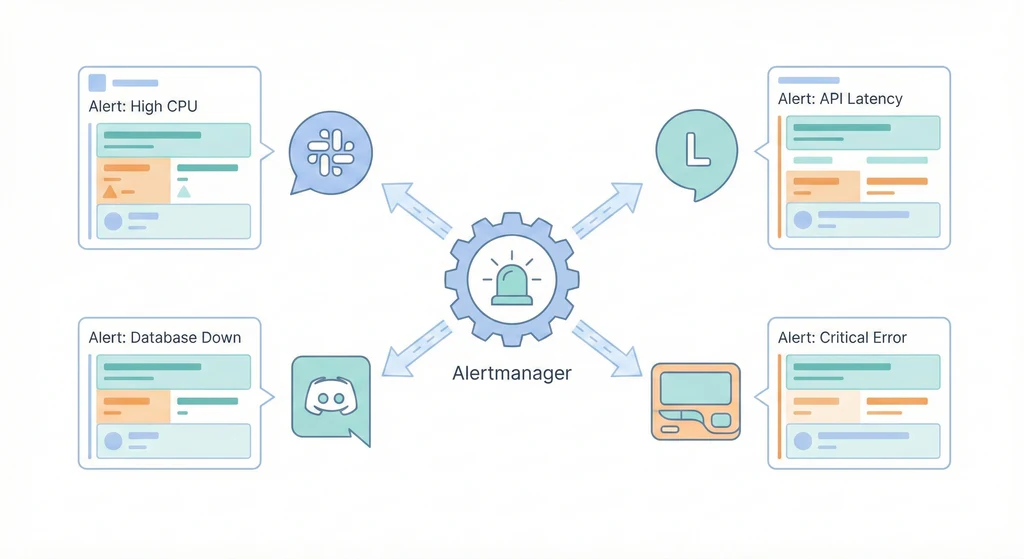
Prometheus 觸發告警後送到 Alertmanager,Alertmanager 根據 label(severity、team、service)路由到不同的 receiver。每個 receiver 對應一個或多個 Webhook endpoint。通知的內容由 .tmpl 模板檔案控制,可以自訂顏色、格式、連結。一條 Critical 告警可以同時送到 Slack 和 PagerDuty,確保不會漏接。

核心概念

  1. Webhook 的運作原理:Webhook 本質上就是一個 HTTP POST 請求,帶著 JSON payload 送到指定的 URL。當 Alertmanager 需要發通知時,它會把告警內容序列化成 JSON,POST 到你設定的 Webhook URL。每個平台期望的 JSON 結構不同:Slack 用 {"text": "..."} 或 Block Kit 格式、Discord 用 {"content": "..."} 或 Embed 格式、Line Notify 用 form-urlencoded 而非 JSON。搞清楚每個平台的 payload 格式是整合的第一步。

  2. Alertmanager Receiver 類型:Alertmanager 原生支援多種 receiver 類型:slack_configs(Slack Incoming Webhook)、webhook_configs(通用 HTTP POST,可以對接任何服務)、email_configs(SMTP 寄信)、pagerduty_configs(PagerDuty Events API)、opsgenie_configs(OpsGenie Alert API)、wechat_configs(企業微信)。Slack 和 PagerDuty 有原生支援,Discord 和 Line Notify 則需要透過 webhook_configs 搭配自訂 payload 或中介服務來處理。

  3. Message Templating(Go Template 語法):Alertmanager 使用 Go 的 text/template 語法來格式化通知內容。在模板裡可以存取 .Status(firing/resolved)、.Alerts(告警列表)、.GroupLabels.CommonLabels.CommonAnnotations 等欄位。你可以用 {{ range .Alerts }} 迭代每個告警、用 {{ if eq .Status "firing" }} 做條件判斷、用 {{ .Labels.severity }} 存取 label 值。模板寫好後放在 .tmpl 檔案裡,在 alertmanager.yml 裡用 templates 欄位引入。

  4. Route Matching(路由匹配):Alertmanager 的路由是樹狀結構,從根節點開始往下匹配。每個 route 可以用 match(精確匹配)或 match_re(正則匹配)來過濾告警。常見的路由策略:按 severity 分流(critical 走 PagerDuty + Slack、warning 走 Discord、info 走 email);按 team 分流(backend 告警送到 #backend-alerts、frontend 告警送到 #frontend-alerts);按 service 分流(database 告警送給 DBA、network 告警送給 NetOps)。路由可以巢狀,先按 severity 分再按 team 分。

  5. Silencing 與 Inhibition(避免告警風暴):Silencing 是手動靜音某個告警一段時間(例如維護期間暫停 HostDown 告警)。Inhibition 是自動抑制——如果 A 告警已經觸發,就自動抑制 B 告警。經典案例:Host 掛了(HostDown),上面跑的 10 個服務都會觸發告警,但真正的根因只有一個。設定 inhibit_rules 讓 HostDown 抑制同一台 Host 上的所有服務告警,通知就從 10 條變成 1 條。

  6. Grouping(告警聚合)group_by 設定讓 Alertmanager 把相同 label 組合的告警合併成一條通知。例如 group_by: ['alertname', 'cluster'] 會把同一個 cluster 上的同類型告警合併。group_wait 控制第一次通知前等多久(等待更多同類告警加入)、group_interval 控制已有 group 收到新告警後多久再發一次通知。合理的 grouping 設定可以大幅減少通知數量,避免 alert fatigue。

實作模板

以下是各平台 Webhook 整合的完整模板,可以直接複製到你的 alertmanager.yml 裡修改使用。

模板 1:Slack Incoming Webhook

Slack 是 Alertmanager 原生支援的平台,設定最直覺。重點是用 color 欄位根據 severity 顯示不同顏色的側邊條,讓收到通知的人一眼區分嚴重程度。

# alertmanager.yml - Slack receiver
receivers:
  - name: 'slack-critical'
    slack_configs:
      - api_url: '${SLACK_WEBHOOK_URL}'
        channel: '#incidents'
        send_resolved: true
        # severity 對應顏色:critical=紅色, warning=橘色, info=藍色
        color: '{{ if eq .Status "firing" }}{{ if eq .CommonLabels.severity "critical" }}#FF0000{{ else if eq .CommonLabels.severity "warning" }}#FFA500{{ else }}#0000FF{{ end }}{{ else }}#00FF00{{ end }}'
        title: '{{ if eq .Status "firing" }}[FIRING] {{ .CommonLabels.alertname }}{{ else }}[RESOLVED] {{ .CommonLabels.alertname }}{{ end }}'
        title_link: 'https://grafana.example.com/alerting/list'
        text: >-
          {{ range .Alerts }}
          *Severity:* `{{ .Labels.severity }}`
          *Instance:* `{{ .Labels.instance }}`
          *Summary:* {{ .Annotations.summary }}
          *Description:* {{ .Annotations.description }}
          *Runbook:* {{ .Annotations.runbook_url }}
          *Started:* {{ .StartsAt.Format "2006-01-02 15:04:05 MST" }}
          {{ if .EndsAt }}*Resolved:* {{ .EndsAt.Format "2006-01-02 15:04:05 MST" }}{{ end }}
          ---
          {{ end }}
        fallback: '{{ .CommonLabels.alertname }}: {{ .CommonAnnotations.summary }}'
        icon_emoji: ':rotating_light:'
        username: 'Alertmanager'

模板 2:Discord Webhook

Discord 的 Webhook 格式和 Slack 完全不同,Alertmanager 沒有原生支援 Discord,需要用 webhook_configs。Discord 接受的 JSON 格式是 {"content": "...", "embeds": [...]},但 Alertmanager 預設送出的 JSON 格式是它自己的結構,Discord 無法直接解析。有兩種做法:用一個中介服務(如 alertmanager-discord)轉換格式,或利用 Discord 的 /slack 相容 endpoint。

# 方法一(推薦):使用 Discord 的 Slack-compatible endpoint
# Discord Webhook URL 後面加上 /slack 即可接受 Slack 格式
receivers:
  - name: 'discord-alerts'
    slack_configs:
      - api_url: 'https://discord.com/api/webhooks/YOUR_WEBHOOK_ID/YOUR_WEBHOOK_TOKEN/slack'
        send_resolved: true
        title: '{{ if eq .Status "firing" }}[FIRING]{{ else }}[RESOLVED]{{ end }} {{ .CommonLabels.alertname }}'
        text: >-
          {{ range .Alerts }}
          **Severity:** {{ .Labels.severity }}
          **Instance:** {{ .Labels.instance }}
          **Summary:** {{ .Annotations.summary }}
          {{ end }}
 
# 方法二:使用 alertmanager-discord 中介服務
# 先部署 alertmanager-discord(一個輕量的 Go 程式)
# docker run -d -p 9094:9094 -e DISCORD_WEBHOOK=https://discord.com/api/webhooks/... benjojo/alertmanager-discord
receivers:
  - name: 'discord-via-bridge'
    webhook_configs:
      - url: 'http://alertmanager-discord:9094'
        send_resolved: true

模板 3:Line Notify

Line Notify 是台灣和日本團隊常用的通知管道。Line Notify 的 API 不接受 JSON,而是用 application/x-www-form-urlencoded 格式,而且需要 Bearer Token 認證。Alertmanager 原生的 webhook_configs 無法直接對接 Line Notify,需要一個中介服務來轉換格式。

# 需要部署一個 webhook bridge 服務,將 Alertmanager JSON 轉換為 Line Notify 格式
# 以下是 bridge 服務的 docker-compose 設定
 
# docker-compose.line-bridge.yml
version: "3.8"
services:
  line-notify-bridge:
    image: node:20-alpine
    restart: unless-stopped
    ports:
      - "127.0.0.1:9095:9095"
    environment:
      LINE_NOTIFY_TOKEN: '${LINE_NOTIFY_TOKEN}'
      PORT: 9095
    volumes:
      - ./line-bridge.js:/app/index.js
    command: node /app/index.js
 
# line-bridge.js(簡易版,接收 Alertmanager JSON 並轉發到 Line Notify)
# const http = require('http');
# const https = require('https');
# const querystring = require('querystring');
#
# const LINE_TOKEN = process.env.LINE_NOTIFY_TOKEN;
# const PORT = process.env.PORT || 9095;
#
# http.createServer((req, res) => {
#   if (req.method === 'POST') {
#     let body = '';
#     req.on('data', chunk => body += chunk);
#     req.on('end', () => {
#       const alert = JSON.parse(body);
#       const status = alert.status === 'firing' ? '[FIRING]' : '[RESOLVED]';
#       let message = `\n${status} Alertmanager\n`;
#       alert.alerts.forEach(a => {
#         message += `\nAlert: ${a.labels.alertname}`;
#         message += `\nSeverity: ${a.labels.severity}`;
#         message += `\nInstance: ${a.labels.instance}`;
#         message += `\nSummary: ${a.annotations.summary}\n`;
#       });
#       const postData = querystring.stringify({ message });
#       const options = {
#         hostname: 'notify-api.line.me',
#         path: '/api/notify',
#         method: 'POST',
#         headers: {
#           'Content-Type': 'application/x-www-form-urlencoded',
#           'Authorization': `Bearer ${LINE_TOKEN}`,
#         },
#       };
#       const lineReq = https.request(options, lineRes => {
#         res.writeHead(lineRes.statusCode);
#         res.end('OK');
#       });
#       lineReq.write(postData);
#       lineReq.end();
#     });
#   }
# }).listen(PORT, () => console.log(`Line bridge listening on ${PORT}`));
 
# Alertmanager 設定
receivers:
  - name: 'line-notify'
    webhook_configs:
      - url: 'http://line-notify-bridge:9095'
        send_resolved: true

模板 4:PagerDuty 整合(On-Call 輪值)

PagerDuty 是 on-call 管理的業界標準,適合需要 24/7 值班的團隊。Alertmanager 原生支援 PagerDuty,設定簡單。PagerDuty 會根據 Escalation Policy 決定通知誰——如果 on-call 的人 5 分鐘沒回應,自動升級到下一位。

# alertmanager.yml - PagerDuty receiver
receivers:
  - name: 'pagerduty-critical'
    pagerduty_configs:
      - service_key: '${PAGERDUTY_SERVICE_KEY}'
        # 或使用 routing_key(Events API v2)
        # routing_key: '${PAGERDUTY_ROUTING_KEY}'
        severity: '{{ .CommonLabels.severity }}'
        # PagerDuty 的 description 欄位
        description: '{{ .CommonAnnotations.summary }}'
        # 自訂欄位,會顯示在 PagerDuty incident 頁面
        details:
          alertname: '{{ .CommonLabels.alertname }}'
          instance: '{{ .CommonLabels.instance }}'
          severity: '{{ .CommonLabels.severity }}'
          summary: '{{ .CommonAnnotations.summary }}'
          runbook: '{{ .CommonAnnotations.runbook_url }}'
          grafana: 'https://grafana.example.com/d/overview'
        # 告警恢復時自動 resolve PagerDuty incident
        send_resolved: true
 
  # 搭配 Slack 雙管道通知:Critical 同時送 PagerDuty 和 Slack
  - name: 'critical-multi-channel'
    pagerduty_configs:
      - service_key: '${PAGERDUTY_SERVICE_KEY}'
        send_resolved: true
    slack_configs:
      - api_url: '${SLACK_WEBHOOK_URL}'
        channel: '#incidents'
        send_resolved: true
        title: '[CRITICAL] {{ .CommonLabels.alertname }}'
        text: '{{ .CommonAnnotations.summary }}'

模板 5:通用 Custom Webhook(HTTP POST 到任何服務)

如果你有自建的告警處理系統、內部工單系統、或任何可以接收 HTTP POST 的服務,都可以用 webhook_configs 來對接。Alertmanager 會把完整的告警 JSON 送過去,你的服務負責解析和處理。

# alertmanager.yml - Generic webhook receiver
receivers:
  - name: 'custom-webhook'
    webhook_configs:
      - url: 'https://internal-api.example.com/alerts/incoming'
        send_resolved: true
        # HTTP 基本認證
        http_config:
          basic_auth:
            username: 'alertmanager'
            password: '${WEBHOOK_PASSWORD}'
          # 或使用 Bearer Token
          # authorization:
          #   type: Bearer
          #   credentials: '${WEBHOOK_TOKEN}'
          # TLS 設定(如果用自簽憑證)
          # tls_config:
          #   ca_file: /etc/alertmanager/certs/ca.pem
          #   insecure_skip_verify: false
        # 最大重試次數(預設 Alertmanager 會持續重試)
        # 可以用 max_alerts 限制一次通知包含的告警數
        max_alerts: 10
 
  # 另一個範例:送到內部工單系統自動開 ticket
  - name: 'ticket-system'
    webhook_configs:
      - url: 'https://tickets.example.com/api/v1/alerts'
        send_resolved: true
        http_config:
          authorization:
            type: Bearer
            credentials: '${TICKET_API_TOKEN}'

模板 6:完整 alertmanager.yml(多管道路由)

以下是一個完整的 alertmanager.yml,整合了上面所有的模板,展示如何用路由規則將不同告警導向不同的通知管道。

# alertmanager.yml - 完整版多管道路由設定
global:
  resolve_timeout: 5m
  slack_api_url: '${SLACK_WEBHOOK_URL}'
 
# 引入自訂通知模板
templates:
  - '/etc/alertmanager/templates/*.tmpl'
 
# 路由規則(樹狀結構,從上往下匹配)
route:
  receiver: 'default-slack'
  group_by: ['alertname', 'cluster', 'service']
  group_wait: 30s
  group_interval: 5m
  repeat_interval: 4h
 
  routes:
    # Critical 告警:立即通知,PagerDuty + Slack + Line
    - match:
        severity: critical
      receiver: 'critical-all-channels'
      group_wait: 10s
      repeat_interval: 1h
      continue: false
 
    # Warning 告警:按 team 分流
    - match:
        severity: warning
      group_wait: 3m
      repeat_interval: 4h
      routes:
        # Backend team 的 warning 送到 Discord
        - match:
            team: backend
          receiver: 'discord-backend'
        # Frontend team 的 warning 送到 Slack
        - match:
            team: frontend
          receiver: 'slack-frontend'
        # DBA 的 warning 送到專屬 channel
        - match:
            team: dba
          receiver: 'slack-dba'
        # 未匹配的 warning 走預設
        - match_re:
            team: '.*'
          receiver: 'default-slack'
 
    # Info 告警:每小時彙整,只寄 email
    - match:
        severity: info
      receiver: 'info-email'
      group_wait: 1h
      repeat_interval: 24h
 
# 抑制規則
inhibit_rules:
  # Host 掛了就抑制該 Host 上所有服務的告警
  - source_match:
      alertname: 'HostDown'
    target_match_re:
      alertname: '.+'
    equal: ['instance']
 
  # Cluster 掛了就抑制該 Cluster 的所有告警
  - source_match:
      alertname: 'ClusterUnreachable'
    target_match_re:
      alertname: '.+'
    equal: ['cluster']
 
  # Critical 告警存在時抑制同 alertname 的 Warning
  - source_match:
      severity: 'critical'
    target_match:
      severity: 'warning'
    equal: ['alertname', 'instance']
 
# Receivers 定義
receivers:
  - name: 'default-slack'
    slack_configs:
      - channel: '#alerts'
        send_resolved: true
        title: '{{ template "slack.title" . }}'
        text: '{{ template "slack.text" . }}'
        color: '{{ template "slack.color" . }}'
 
  - name: 'critical-all-channels'
    pagerduty_configs:
      - service_key: '${PAGERDUTY_SERVICE_KEY}'
        send_resolved: true
    slack_configs:
      - channel: '#incidents'
        send_resolved: true
        title: '{{ template "slack.title" . }}'
        text: '{{ template "slack.text" . }}'
        color: '{{ template "slack.color" . }}'
    webhook_configs:
      # Line Notify(透過 bridge 服務)
      - url: 'http://line-notify-bridge:9095'
        send_resolved: true
 
  - name: 'discord-backend'
    slack_configs:
      - api_url: 'https://discord.com/api/webhooks/${DISCORD_BACKEND_WEBHOOK}/slack'
        send_resolved: true
        title: '{{ template "slack.title" . }}'
        text: '{{ template "slack.text" . }}'
 
  - name: 'slack-frontend'
    slack_configs:
      - channel: '#frontend-alerts'
        send_resolved: true
        title: '{{ template "slack.title" . }}'
        text: '{{ template "slack.text" . }}'
        color: '{{ template "slack.color" . }}'
 
  - name: 'slack-dba'
    slack_configs:
      - channel: '#dba-alerts'
        send_resolved: true
        title: '{{ template "slack.title" . }}'
        text: '{{ template "slack.text" . }}'
        color: '{{ template "slack.color" . }}'
 
  - name: 'info-email'
    email_configs:
      - to: 'team@example.com'
        from: 'alertmanager@example.com'
        smarthost: 'smtp.example.com:587'
        auth_username: '${SMTP_USERNAME}'
        auth_password: '${SMTP_PASSWORD}'
        send_resolved: false
        headers:
          Subject: '[INFO] Alertmanager Daily Digest'

Alertmanager 通知模板檔案(.tmpl)

以下是自訂的通知模板檔案,放在 /etc/alertmanager/templates/ 目錄下,讓所有 receiver 共用一致的格式。

{{/* /etc/alertmanager/templates/custom.tmpl */}}
 
{{/* Slack 標題模板 */}}
{{ define "slack.title" -}}
{{ if eq .Status "firing" -}}
  [FIRING:{{ .Alerts.Firing | len }}] {{ .CommonLabels.alertname }}
{{- else -}}
  [RESOLVED:{{ .Alerts.Resolved | len }}] {{ .CommonLabels.alertname }}
{{- end }}
{{- end }}
 
{{/* Slack 內文模板 */}}
{{ define "slack.text" -}}
{{ if eq .Status "firing" -}}
  *Cluster:* {{ .CommonLabels.cluster | default "N/A" }}
  *Namespace:* {{ .CommonLabels.namespace | default "N/A" }}
{{ end -}}
{{ range .Alerts -}}
  {{ if eq .Status "firing" }}:red_circle:{{ else }}:large_green_circle:{{ end }} *{{ .Labels.alertname }}*
  *Severity:* `{{ .Labels.severity }}`
  *Instance:* `{{ .Labels.instance | default "N/A" }}`
  *Summary:* {{ .Annotations.summary }}
  {{ if .Annotations.description }}*Description:* {{ .Annotations.description }}{{ end }}
  {{ if .Annotations.runbook_url }}*Runbook:* <{{ .Annotations.runbook_url }}|View Runbook>{{ end }}
  *Since:* {{ .StartsAt.Format "2006-01-02 15:04:05 MST" }}
  {{ if eq .Status "resolved" }}*Resolved:* {{ .EndsAt.Format "2006-01-02 15:04:05 MST" }}{{ end }}
  ---
{{ end -}}
*Dashboard:* <https://grafana.example.com/d/overview|Grafana Overview>
{{- end }}
 
{{/* Slack 顏色模板:根據 severity 和狀態決定側邊條顏色 */}}
{{ define "slack.color" -}}
{{ if eq .Status "resolved" -}}
  #2EB67D
{{- else if eq .CommonLabels.severity "critical" -}}
  #E01E5A
{{- else if eq .CommonLabels.severity "warning" -}}
  #ECB22E
{{- else -}}
  #36C5F0
{{- end }}
{{- end }}
 
{{/* Email 主旨模板 */}}
{{ define "email.subject" -}}
[{{ .Status | toUpper }}] {{ .CommonLabels.alertname }} ({{ .Alerts | len }} alerts)
{{- end }}

常見問題與風險

  • Webhook URL 洩漏(任何人都能發通知):Webhook URL 本身就是認證——任何拿到 URL 的人都能發訊息到你的 channel。如果 URL 不小心 commit 到 Git repo 或貼在公開文件裡,攻擊者可以發送假告警製造混亂、或發送釣魚訊息。避免方式:Webhook URL 一律存在環境變數或 Secrets 管理系統 裡,alertmanager.yml${ENV_VAR} 引用。定期輪換 Webhook URL(大多數平台支援重新產生 URL)。設定 channel 權限限制誰可以建立 Webhook。

  • Rate Limiting(平台限制太頻繁的呼叫):各平台都有 rate limit。Slack 的 Incoming Webhook 限制每秒 1 則訊息;Discord 限制每分鐘 30 則訊息(全域每秒 50 則);Line Notify 限制每小時 1000 則。超過限制的訊息會被丟棄,你的 Critical 告警可能因為 rate limit 而沒送出去。避免方式:善用 Alertmanager 的 group_bygroup_waitgroup_interval 把多個告警合併成一條通知。repeat_interval 不要設太短(Critical 至少 1 小時、Warning 至少 4 小時)。

  • 告警風暴(一個根因觸發大量告警):一台 Host 掛了,上面跑的 20 個容器各觸發一個告警,再加上 node_exporter 的各種指標告警,一次可能產生 50+ 告警。如果沒有 grouping 和 inhibition,通知管道會被灌爆、團隊手機響個不停、真正重要的資訊反而被淹沒。避免方式:設定 inhibit_rules(HostDown 抑制該 Host 上所有告警)、group_by 聚合同類告警、group_wait 等待聚合窗口。考慮設定 max_alerts 限制單一通知包含的告警數量。

  • 通知管道掛了但沒人知道(Alertmanager 自身的監控):Alertmanager 發送通知失敗時,它會記錄到自己的 log 和 metrics 裡,但如果沒有人監控 Alertmanager 本身,通知管道可能已經掛了幾天都沒人發現。這是「誰來監控監控系統」的經典問題。避免方式:用 Prometheus 監控 Alertmanager 的 alertmanager_notifications_failed_total 指標,如果通知失敗次數增加就用另一個管道告警(例如 Alertmanager 送 Slack 失敗時改用 email 通知)。設定 Dead Man’s Switch——一個永遠處於 firing 狀態的告警(Watchdog),如果某段時間沒收到這個告警的通知,就代表通知管道斷了。

  • 模板語法錯誤導致通知失敗:Go template 語法錯誤不會在 Alertmanager 啟動時被完整檢查,有時候要等到實際發送通知時才會報錯。模板裡引用了不存在的 label 或 annotation 欄位,會導致整批通知發送失敗。避免方式:模板裡使用 {{ .Labels.severity | default "unknown" }} 加上 default 值避免空值錯誤。用 amtool 工具在部署前驗證設定檔和模板語法。在 staging 環境先測試告警通知流程。

  • 時區與語系問題:Alertmanager 預設使用 UTC 時間,通知裡顯示的時間可能讓亞洲時區的團隊困惑。模板裡的時間格式化要特別注意。避免方式:在模板裡明確指定時區,或在 Alertmanager 的環境變數裡設定 TZ=Asia/Taipei

驗證與測試

部署完成後,可以用以下方法測試通知管道是否正常運作:

# 用 amtool 發送測試告警
amtool alert add test-alert \
  severity=critical \
  instance=test-host:9090 \
  --annotation.summary="This is a test alert" \
  --annotation.runbook_url="https://wiki.example.com/runbook/test" \
  --alertmanager.url=http://localhost:9093
 
# 確認告警已被 Alertmanager 接收
amtool alert query --alertmanager.url=http://localhost:9093
 
# 用 curl 直接測試 Alertmanager API
curl -X POST http://localhost:9093/api/v2/alerts \
  -H 'Content-Type: application/json' \
  -d '[
    {
      "labels": {
        "alertname": "TestAlert",
        "severity": "warning",
        "instance": "localhost:9090",
        "team": "backend"
      },
      "annotations": {
        "summary": "This is a test alert from curl",
        "runbook_url": "https://wiki.example.com/runbook/test"
      },
      "startsAt": "2024-09-15T10:00:00Z",
      "generatorURL": "http://prometheus:9090/graph"
    }
  ]'
 
# 驗證 Alertmanager 設定檔語法
amtool check-config alertmanager.yml
 
# 測試路由匹配(確認告警會被路由到正確的 receiver)
amtool config routes test \
  --config.file=alertmanager.yml \
  --tree \
  severity=critical team=backend

小結

Webhook 整合不只是「把 URL 貼上去」這麼簡單。每個平台的格式、認證、限制都不同,需要針對性的設定。更重要的是告警路由的設計——讓 Critical 告警能立即到達 on-call 的人手上,Warning 告警在合理的時間內被團隊看到,Info 告警不要干擾日常工作。善用 grouping、inhibition、silencing 來控制通知量,避免告警風暴把團隊淹沒。最後不要忘了監控通知管道本身——Dead Man’s Switch 是最有效的保險機制。


延伸閱讀