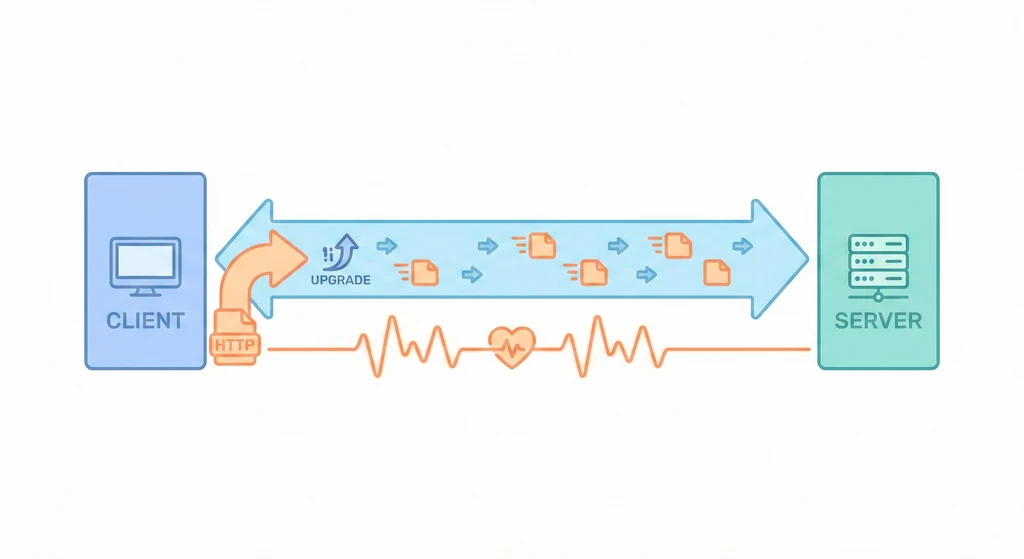
WebSocket:當 HTTP 的請求-回應模式不夠用
HTTP 是「客戶端問、伺服器答」的模式,伺服器無法主動推送訊息給客戶端。如果需要即時通知(聊天訊息、訂單狀態變更、即時價格更新),用 HTTP polling(每 N 秒問一次「有新資料嗎?」)既浪費資源又有延遲。WebSocket 建立後維持持久連線,雙方都可以隨時發送訊息,延遲從秒級降到毫秒級。
架構概覽
sequenceDiagram participant C as 客戶端 participant S as WebSocket Server C->>S: HTTP Upgrade 請求 S-->>C: 101 Switching Protocols Note over C,S: 建立持久連線 C->>S: 發送訊息 S->>C: 推送事件 S->>C: 推送事件 C->>S: 發送訊息 Note over C,S: 心跳保持連線 S->>C: Ping C-->>S: Pong C->>S: Close S-->>C: Close 確認
架構概覽
flowchart TD Client[Client Browser\nWebSocket Client] -->|ws:// upgrade| Nginx[Nginx\nWebSocket Proxy] Nginx -->|proxy_pass| WS[WebSocket Server\nSocket.IO / ws\n:3001] WS --> ConnMgr[Connection Manager\n管理所有連線] ConnMgr --> Room1[Room: order-123\n訂單狀態推送] ConnMgr --> Room2[Room: chat-456\n聊天室] ConnMgr --> Room3[Room: dashboard\n即時儀表板] API[API Service] -->|publish event| Redis[Redis Pub/Sub] Redis -->|subscribe| WS WS -->|push to clients| Client
客戶端透過 Nginx 建立 WebSocket 連線到 WS Server。API Service 有事件要推送時,透過 Redis Pub/Sub 通知 WS Server,WS Server 再推送到對應的客戶端。
核心概念
-
WebSocket vs 替代方案:先確認是否真的需要 WebSocket。Short Polling(每 5 秒 HTTP 請求一次):最簡單,適合更新頻率低、對延遲不敏感的場景(例如每分鐘更新一次的排行榜)。Long Polling(HTTP 請求保持開啟直到有新資料):延遲比 Short Polling 好,但每次回應後要重新建立連線,開銷不小。Server-Sent Events(SSE):伺服器單向推送,比 WebSocket 簡單,適合只需要「伺服器推到客戶端」的場景(例如即時通知)。WebSocket:雙向通訊,適合聊天、協作編輯、遊戲等需要客戶端也頻繁發送訊息的場景。
-
連線管理:每個 WebSocket 連線會佔用一個 file descriptor 和一些記憶體(約 2-10KB per connection)。一台普通的伺服器可以維持數千到數萬個連線。關鍵是做好連線的生命週期管理:連線建立時驗證身份(token)、將連線加入對應的 Room/Channel、定期心跳檢測(ping/pong)確認連線存活、連線斷開時清理資源。
-
心跳機制(Heartbeat):WebSocket 連線可能因為網路問題「靜默斷開」——TCP 層面已經斷了,但雙方都不知道。心跳機制是定期發送 ping frame,如果一定時間內沒有收到 pong,就判定連線已斷開並清理。建議心跳間隔 25-30 秒(要小於 Nginx 的
proxy_read_timeout,否則 Nginx 會先關閉連線)。 -
多節點擴展:單台 WS Server 有連線數上限。當需要多台 WS Server 時,問題是「客戶端 A 連到 Server 1,但要推送訊息給它的 API 事件可能被 Server 2 處理」。解法是用 Redis Pub/Sub(或 Redis Adapter)作為中間層:API 發布事件到 Redis,所有 WS Server 都訂閱 Redis,收到事件後推送給自己管理的連線。Socket.IO 原生支援 Redis Adapter,設定幾行就搞定。
使用情境
-
訂單狀態推送:使用者下訂單後停留在訂單頁面。每當訂單狀態變更(已付款 → 出貨中 → 已送達),API 發布事件到 Redis,WS Server 推送到該使用者的 WebSocket 連線。使用者不需要重新整理頁面就能看到最新狀態。
-
即時聊天:客服系統的即時聊天功能。客戶和客服各自建立 WebSocket 連線,加入同一個 chat room。一方發送訊息,WS Server 即時轉發給 room 裡的另一方。歷史訊息存在 PostgreSQL,即時訊息走 WebSocket。
-
即時儀表板:監控 dashboard 顯示即時的系統指標(訂單數、營收、錯誤率)。後端每秒計算一次指標,透過 WebSocket 推送到所有打開 dashboard 的客戶端。比起每秒 HTTP polling,WebSocket 的資源消耗低很多。
實作範例 / 設定範例
Nginx WebSocket 代理設定
# /etc/nginx/conf.d/websocket.conf
# WebSocket 需要的 header mapping
map $http_upgrade $connection_upgrade {
default upgrade;
'' close;
}
upstream websocket_backend {
server 127.0.0.1:3001;
# 如果有多台 WS Server,用 ip_hash 確保同一客戶端連到同一台
# ip_hash;
}
server {
listen 443 ssl http2;
server_name ws.example.com;
ssl_certificate /etc/letsencrypt/live/example.com/fullchain.pem;
ssl_certificate_key /etc/letsencrypt/live/example.com/privkey.pem;
location /socket.io/ {
proxy_pass http://websocket_backend;
proxy_http_version 1.1;
# WebSocket 升級 header
proxy_set_header Upgrade $http_upgrade;
proxy_set_header Connection $connection_upgrade;
proxy_set_header Host $host;
proxy_set_header X-Real-IP $remote_addr;
proxy_set_header X-Forwarded-For $proxy_add_x_forwarded_for;
# 超時設定(要大於心跳間隔)
proxy_read_timeout 60s;
proxy_send_timeout 60s;
}
}Socket.IO Server(Node.js)
// ws-server.ts
import { Server } from 'socket.io';
import { createAdapter } from '@socket.io/redis-adapter';
import { createClient } from 'redis';
import http from 'http';
const httpServer = http.createServer();
const io = new Server(httpServer, {
cors: { origin: ['https://example.com'] },
pingInterval: 25000, // 25 秒心跳
pingTimeout: 10000, // 10 秒無回應判定斷線
});
// Redis Adapter(多節點擴展用)
const pubClient = createClient({ url: process.env.REDIS_URL });
const subClient = pubClient.duplicate();
await pubClient.connect();
await subClient.connect();
io.adapter(createAdapter(pubClient, subClient));
// 連線認證
io.use((socket, next) => {
const token = socket.handshake.auth.token;
try {
const user = verifyJWT(token);
socket.data.userId = user.id;
next();
} catch (err) {
next(new Error('Authentication failed'));
}
});
io.on('connection', (socket) => {
console.log(`Connected: ${socket.data.userId}`);
// 加入使用者專屬 room
socket.join(`user:${socket.data.userId}`);
// 客戶端訂閱特定訂單的狀態更新
socket.on('subscribe:order', (orderId: string) => {
socket.join(`order:${orderId}`);
});
socket.on('disconnect', (reason) => {
console.log(`Disconnected: ${socket.data.userId} (${reason})`);
});
});
// API 透過 Redis Pub/Sub 推送事件
const subscriber = createClient({ url: process.env.REDIS_URL });
await subscriber.connect();
await subscriber.subscribe('order:status-changed', (message) => {
const event = JSON.parse(message);
io.to(`order:${event.orderId}`).emit('order:updated', {
orderId: event.orderId,
status: event.newStatus,
});
});
httpServer.listen(3001);客戶端連線(前端)
// client.ts
import { io } from 'socket.io-client';
const socket = io('wss://ws.example.com', {
auth: { token: localStorage.getItem('jwt') },
reconnection: true,
reconnectionDelay: 1000,
reconnectionDelayMax: 5000,
reconnectionAttempts: 10,
});
socket.on('connect', () => {
console.log('WebSocket connected');
// 訂閱訂單狀態
socket.emit('subscribe:order', orderId);
});
socket.on('order:updated', (data) => {
console.log(`Order ${data.orderId} status: ${data.status}`);
updateUI(data);
});
socket.on('disconnect', (reason) => {
console.log(`Disconnected: ${reason}`);
});常見問題與風險
-
Nginx 超時關閉連線:Nginx 的
proxy_read_timeout預設 60 秒,如果這段時間沒有資料傳輸,Nginx 會關閉連線。避免方式:確保心跳間隔(pingInterval)小於proxy_read_timeout。例如心跳 25 秒、Nginx 超時 60 秒。 -
連線數耗盡:每個 WebSocket 連線佔一個 file descriptor。Linux 預設 ulimit 通常是 1024。如果連線數超過限制,新的連線會被拒絕。避免方式:調高
ulimit -n(建議 65535)。在 systemd 的 service file 加LimitNOFILE=65535。 -
記憶體洩漏:連線斷開後沒有正確清理(例如 Room 裡的 reference 沒有移除),長時間運行後記憶體持續增長。避免方式:在
disconnect事件裡確保清理所有資源。Socket.IO 會自動管理 room membership,但自訂的資料結構要手動清理。 -
重連風暴:WS Server 重啟時,所有客戶端同時嘗試重連,瞬間湧入大量連線請求。避免方式:客戶端重連用 exponential backoff + jitter(隨機延遲),讓重連時間分散開來。
優點
- 即時雙向通訊,延遲極低
- 比 HTTP polling 節省大量網路資源
- Socket.IO 提供自動重連、Room 管理、多節點擴展等開箱即用的功能
缺點 / 限制
- 持久連線佔用 server 資源,無法像 HTTP 那樣無狀態水平擴展
- 連線管理增加運維複雜度
- 部分防火牆或代理可能不支援 WebSocket(Socket.IO 會 fallback 到 Long Polling)