cover

API Gateway:前端只需要知道一個入口

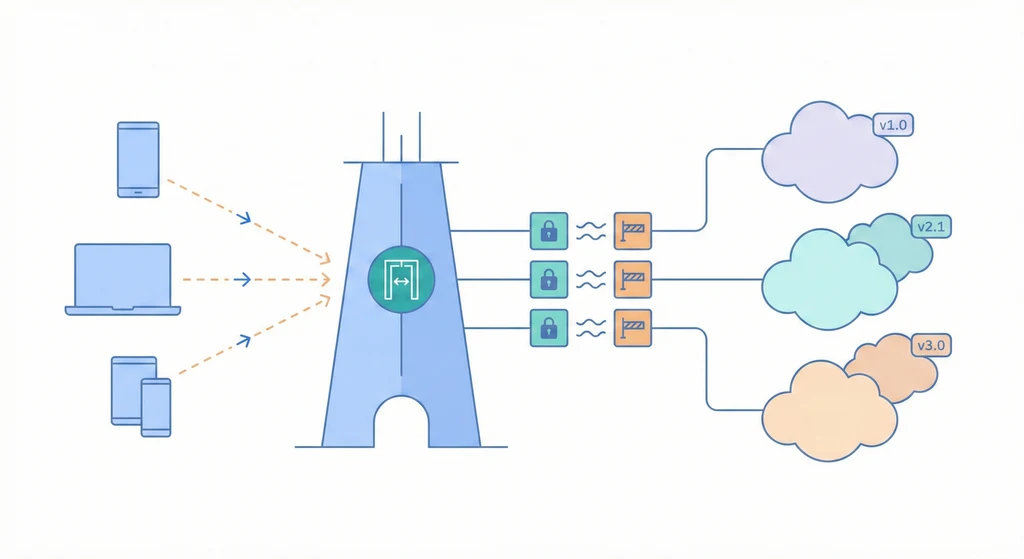
當後端有多個微服務(User Service、Order Service、Payment Service),前端不應該直接和每個服務溝通——這意味著前端要知道每個服務的位址、每個服務各自做認證檢查、限流規則分散在各處。API Gateway 是所有 API 請求的統一入口,負責路由分發、統一認證、限流、日誌記錄。前端只需要知道一個 endpoint,Gateway 負責把請求轉到正確的後端服務。

架構概覽

flowchart TD
  Client[客戶端\nWeb / Mobile] -->|HTTPS| GW[API Gateway]
  GW --> Auth[認證\nJWT 驗證]
  GW --> Rate[限流\nRate Limiting]
  GW --> Log[日誌\n請求記錄]
  Auth --> Route{路由分發}
  Route -->|/users| Svc1[User Service]
  Route -->|/orders| Svc2[Order Service]
  Route -->|/payments| Svc3[Payment Service]

架構概覽

flowchart TD
  Client[Client\nWeb / Mobile / 3rd Party] -->|HTTPS| Gateway[API Gateway\nNginx / Kong / Traefik]

  Gateway -->|/api/v1/users/*| UserSvc[User Service\n:8001]
  Gateway -->|/api/v1/orders/*| OrderSvc[Order Service\n:8002]
  Gateway -->|/api/v1/payments/*| PaymentSvc[Payment Service\n:8003]
  Gateway -->|/api/v1/files/*| FileSvc[File Service\n:8004]

  Gateway --> Auth[Auth Middleware\nJWT 驗證]
  Gateway --> RateLimit[Rate Limiter\n限流]
  Gateway --> Logger[Request Logger\n存取日誌]
  Gateway --> CORS[CORS\n跨域設定]

所有 API 請求進 Gateway,經過 Auth、Rate Limit、CORS 等 middleware 後,根據 URL path 路由到對應的後端服務。Gateway 也負責統一的日誌記錄。

核心概念

  1. 路由規則設計:路由是 Gateway 的核心功能。建議用 path-based routing(/api/v1/users/* → User Service)而不是 host-based routing(users-api.example.com),因為前者只需要一個域名和一張 TLS 憑證,管理更簡單。路由規則要明確,避免模糊匹配(例如 /api/ 同時匹配 /api/users/api-docs)。用 prefix match + strip prefix,讓後端服務不需要知道自己的路由前綴。

  2. 統一認證(Authentication):在 Gateway 層做 JWT 驗證,而不是在每個後端服務都做。Gateway 檢查 JWT token 的有效性、過期時間、簽名,然後把解碼後的 user info(user_id、role)透過 header 傳給後端。後端服務信任 Gateway 傳來的 header,不需要再做 token 驗證。這樣一來,token 驗證的邏輯只需要維護一份。但要注意:Gateway 和後端之間的通訊必須在內網,防止外部直接繞過 Gateway 偽造 header。

  3. 限流(Rate Limiting):限制每個客戶端的 API 呼叫頻率,防止惡意攻擊或程式 bug 造成的流量洪水。常見策略:按 IP 限流(每 IP 每分鐘 100 次)、按 API key 限流(每 key 每分鐘 1000 次)、按 endpoint 限流(/api/v1/auth/login 每分鐘 10 次,防暴力破解)。被限流的請求回傳 HTTP 429,附帶 Retry-After header 告訴客戶端何時重試。

  4. API 版本管理:API 會演進,但不能每次改動都破壞現有的客戶端。用 URL path 做版本區分(/api/v1//api/v2/),Gateway 可以同時路由到不同版本的後端。當 v2 穩定後,設定 v1 的 deprecation 通知(在 response header 加 SunsetDeprecation),給客戶端遷移的緩衝期。

使用情境

  • 多前端共用後端:Web 和 Mobile app 都透過 api.example.com 存取,Gateway 統一處理 CORS、認證、限流。Web 可能需要不同的 rate limit(更高,因為單頁應用會頻繁呼叫 API),透過不同的 API key 區分。

  • 第三方 API 開放:把部分 API 開放給合作夥伴使用。在 Gateway 建立獨立的 API key,設定嚴格的 rate limit 和 scope(只能存取特定 endpoint)。Gateway 的日誌記錄每個 API key 的使用量,用來計費或偵測異常。

  • 灰度發布(Canary Release):新版 Order Service 部署後,在 Gateway 設定 10% 的流量導到新版、90% 導到舊版。觀察新版的 error rate 和響應時間,如果正常就逐步增加比例到 100%。

實作範例 / 設定範例

Nginx 作為 API Gateway

# /etc/nginx/conf.d/api-gateway.conf
 
# 限流區域定義
limit_req_zone $binary_remote_addr zone=api_general:10m rate=100r/m;
limit_req_zone $binary_remote_addr zone=api_auth:10m rate=10r/m;
 
# 後端服務 upstream
upstream user_service {
    server 127.0.0.1:8001;
    keepalive 16;
}
upstream order_service {
    server 127.0.0.1:8002;
    keepalive 16;
}
upstream payment_service {
    server 127.0.0.1:8003;
    keepalive 16;
}
 
server {
    listen 443 ssl http2;
    server_name api.example.com;
 
    ssl_certificate     /etc/letsencrypt/live/example.com/fullchain.pem;
    ssl_certificate_key /etc/letsencrypt/live/example.com/privkey.pem;
 
    # CORS
    add_header Access-Control-Allow-Origin "$http_origin" always;
    add_header Access-Control-Allow-Methods "GET, POST, PUT, DELETE, OPTIONS" always;
    add_header Access-Control-Allow-Headers "Authorization, Content-Type" always;
 
    # Preflight
    if ($request_method = OPTIONS) {
        return 204;
    }
 
    # === Auth endpoint(嚴格限流)===
    location /api/v1/auth/ {
        limit_req zone=api_auth burst=5 nodelay;
        proxy_pass http://user_service/auth/;
        include /etc/nginx/proxy_params;
    }
 
    # === User Service ===
    location /api/v1/users/ {
        limit_req zone=api_general burst=20 nodelay;
        proxy_pass http://user_service/users/;
        include /etc/nginx/proxy_params;
    }
 
    # === Order Service ===
    location /api/v1/orders/ {
        limit_req zone=api_general burst=20 nodelay;
        proxy_pass http://order_service/orders/;
        include /etc/nginx/proxy_params;
    }
 
    # === Payment Service ===
    location /api/v1/payments/ {
        limit_req zone=api_general burst=20 nodelay;
        proxy_pass http://payment_service/payments/;
        include /etc/nginx/proxy_params;
    }
 
    # API 文件
    location /api/docs {
        alias /usr/share/nginx/html/api-docs/;
        index index.html;
    }
 
    # 未知路徑
    location / {
        return 404 '{"error": "Not Found"}';
        add_header Content-Type application/json;
    }
}

proxy_params 共用設定

# /etc/nginx/proxy_params
proxy_set_header Host $host;
proxy_set_header X-Real-IP $remote_addr;
proxy_set_header X-Forwarded-For $proxy_add_x_forwarded_for;
proxy_set_header X-Forwarded-Proto $scheme;
proxy_set_header X-Request-ID $request_id;
 
proxy_connect_timeout 5s;
proxy_send_timeout 30s;
proxy_read_timeout 30s;
 
# 不快取 API 響應
add_header Cache-Control "no-store" always;

JWT 驗證(Nginx + lua / njs)

# 使用 nginx njs module 做 JWT 驗證(概念範例)
# 實際環境可用 Kong / Traefik 的 JWT plugin 更方便
 
location /api/v1/ {
    # 驗證 Authorization header
    access_by_lua_block {
        local jwt = require "resty.jwt"
        local auth_header = ngx.var.http_authorization
        if not auth_header then
            ngx.status = 401
            ngx.say('{"error": "Missing Authorization header"}')
            return ngx.exit(401)
        end
 
        local token = string.sub(auth_header, 8)  -- Remove "Bearer "
        local jwt_obj = jwt:verify(os.getenv("JWT_SECRET"), token)
        if not jwt_obj.verified then
            ngx.status = 401
            ngx.say('{"error": "Invalid token"}')
            return ngx.exit(401)
        end
 
        -- 把 user info 傳給後端
        ngx.req.set_header("X-User-ID", jwt_obj.payload.sub)
        ngx.req.set_header("X-User-Role", jwt_obj.payload.role)
    }
 
    proxy_pass http://backend;
}

常見問題與風險

  • Gateway 成為效能瓶頸:所有 API 流量都經過 Gateway,如果 Gateway 的處理能力不足,會拖慢所有服務。避免方式:Nginx 的效能通常足以應付每秒數千個請求。確保 keepalive 連線啟用,減少和後端的 TCP 握手開銷。壓測 Gateway 確認它不是瓶頸。

  • 路由規則衝突/api/v1//api/v1/users/ 的匹配優先順序不明確,導致請求被路由到錯誤的後端。避免方式:Nginx 的 location 匹配有明確的優先順序(exact > prefix),但最好避免模糊的規則。測試每個路由規則確認行為正確。

  • CORS 設定不當Access-Control-Allow-Origin: * 會讓任何網站都能呼叫你的 API,可能被惡意利用。避免方式:只允許已知的前端域名。不要在 credentials mode 下用 wildcard。Preflight request(OPTIONS)要正確回傳。

  • 限流太嚴或太鬆:限流太嚴會影響正常使用者體驗,太鬆等於沒有限流。避免方式:先上線寬鬆的限流(例如每分鐘 1000 次),觀察正常流量模式後再逐步收緊。對不同的 endpoint 設定不同的限流閾值。

優點

  • 統一入口讓前端開發更簡單
  • 認證、限流等 cross-cutting concerns 集中管理
  • 路由規則可以快速調整,不需要改後端

缺點 / 限制

  • 增加一層網路跳轉,引入額外延遲(通常 <1ms)
  • Gateway 本身需要高可用設計
  • 複雜的路由邏輯在 Nginx 裡不好維護,可能需要 Kong 或 Traefik

延伸閱讀