結論先講
90% 的 Promise bug 出在錯誤處理。常見錯誤:
- 忘記
try/catch,錯誤被吞掉沒人知道 Promise.all一個 reject 全軍覆沒async函式沒 await,錯誤飛走- Event handler 裡的 async 錯誤直接消失
這篇講 Promise 正確的錯誤處理,以及什麼時候用 Promise.all / allSettled / any / race。
Promise 的三個狀態
pending → fulfilled (resolve)
       \
        → rejected (reject)
- Pending:等待中
- Fulfilled:成功,有結果
- Rejected:失敗,有錯誤
狀態一旦改變就不能再變。
建立 Promise
const promise = new Promise((resolve, reject) => {
  fetch('/api')
    .then(r => resolve(r))
    .catch(e => reject(e));
});
實務上你很少自己 new Promise,大多用現成的(fetch、setTimeout promisified)。
.then / .catch / .finally
fetch('/api')
  .then(r => r.json())
  .then(data => console.log(data))
  .catch(err => console.error(err))
  .finally(() => console.log('done'));
.then(onFulfilled, onRejected)— 雙參數形式少用.catch(onRejected)— 等同.then(null, onRejected).finally(callback)— 不管成功失敗都跑,且不改變 Promise 結果
常見誤用:.catch 位置錯誤
// ❌ 錯:catch 寫太早
fetch('/api')
  .then(r => r.json())
  .catch(err => console.error(err))  // 只抓 fetch 跟第一個 .then 的錯
  .then(data => console.log(data.name));  // 如果 data 沒 name 會炸

// ✅ 對:catch 寫最後
fetch('/api')
  .then(r => r.json())
  .then(data => console.log(data.name))
  .catch(err => console.error(err));  // 全部的錯都抓
async/await:Promise 的糖衣
async function getData() {
  const r = await fetch('/api');
  const data = await r.json();
  return data;  // 回傳 Promise<Data>
}
等同:
function getData() {
  return fetch('/api').then(r => r.json());
}
關鍵:async 函式永遠回傳 Promise
async function foo() {
  return 42;  // 不是回 42,是回 Promise<42>
}

foo();           // Promise { 42 }
foo().then(v => console.log(v));  // 42
await foo(); // 42錯誤處理:try/catch
async function getData() {
  try {
    const r = await fetch('/api');
    if (!r.ok) throw new Error(`HTTP ${r.status}`);
    return await r.json();
  } catch (err) {
    console.error('取資料失敗:', err);
    throw err;  // 繼續往上拋,不要吞掉
  }
}
錯誤處理 5 大陷阱
陷阱 1:錯誤被吞
async function foo() {
  try {
    await doSomething();
  } catch (err) {
    // 什麼都不做
  }
}錯誤默默消失。Production debug 惡夢。最少記個 log。
陷阱 2:fetch 不會 reject HTTP 錯誤
const r = await fetch('/api/404');
// r.ok === false,但 fetch 沒 reject!
const data = await r.json();  // 可能 parse 404 頁面的 HTML
必須手動檢查:
const r = await fetch('/api');
if (!r.ok) throw new Error(`HTTP ${r.status}`);
只有網路層錯誤(DNS、CORS)會讓 fetch reject。HTTP 4xx/5xx 不會。
陷阱 3:忘記 await
async function save() {
  await db.insert(data);  // ✅ 有 await
  fs.writeFile('log', 'done');  // ❌ 忘記 await
  return 'OK';
}
fs.writeFile 是 Promise,不 await 不會等,錯誤也抓不到。函式會直接回 ‘OK’ 即使寫檔失敗。
規則:所有 async 函式結果都該 await。
陷阱 4:Event handler 的 async 錯誤
button.addEventListener('click', async () => {
  throw new Error('boom');  // 錯誤直接消失,不會冒泡
});
Event listener 不等 Promise 結果。錯誤要自己抓:
button.addEventListener('click', async () => {
  try {
    await doSomething();
  } catch (err) {
    showToast(`錯誤:${err.message}`);
  }
});
陷阱 5:Unhandled Promise Rejection
fetch('/api').then(r => r.json());  // 沒 .catch
// 如果 reject,會變 UnhandledPromiseRejection
瀏覽器跟 Node 都有事件:
window.addEventListener('unhandledrejection', (e) => {
  console.error('未處理的 Promise reject:', e.reason);
  // Sentry / 錯誤監控收集
});
生產環境必寫。
Promise.all / allSettled / race / any 選哪個?
| 方法 | 何時 resolve | 何時 reject |
|---|---|---|
Promise.all([...]) | 全部成功 | 任一失敗 → 整個 reject |
Promise.allSettled([...]) | 全部結束(不管成敗) | 永遠不 reject |
Promise.race([...]) | 最先完成的那個 | 最先 reject 的那個 |
Promise.any([...]) | 任一成功 | 全部失敗 → AggregateError |
Promise.all — 需要全部成功時
const [user, posts, comments] = await Promise.all([
  fetchUser(id),
  fetchPosts(id),
  fetchComments(id),
]);
// 任一失敗 → 整個 throw,其他就算完成也拿不到
Promise.allSettled — 允許部分失敗
const results = await Promise.allSettled([
  fetchUser(id),
  fetchPosts(id),
  fetchComments(id),
]);

results.forEach(r => {
  if (r.status === 'fulfilled') console.log('OK:', r.value);
  else console.log('Failed:', r.reason);
});
載多個區塊但單一失敗不該影響其他時用這個。
Promise.race — 先到先贏
// Timeout 模式
const result = await Promise.race([
  fetch('/api'),
  new Promise((_, reject) => setTimeout(() => reject(new Error('Timeout')), 5000)),
]);
Promise.any — 任一成功即可(ES2021)
// 多個備援 API,任一成功即可
const data = await Promise.any([
  fetch('/api-a'),
  fetch('/api-b'),
  fetch('/api-c'),
]);
AbortController:取消 async 操作
const controller = new AbortController();

fetch('/api/slow', { signal: controller.signal })
  .then(r => r.json())
  .catch(err => {
    if (err.name === 'AbortError') {
      console.log('取消了');
    }
  });

// 3 秒後取消
setTimeout(() => controller.abort(), 3000);
React 裡清除 fetch 是經典用法:
useEffect(() => {
  const controller = new AbortController();

  fetch('/api', { signal: controller.signal })
    .then(r => r.json())
    .then(setData)
    .catch(err => {
      if (err.name !== 'AbortError') console.error(err);
    });

  return () => controller.abort();  // unmount 時取消
}, []);
避免 fetch 跑完才發現 component 已經 unmount。
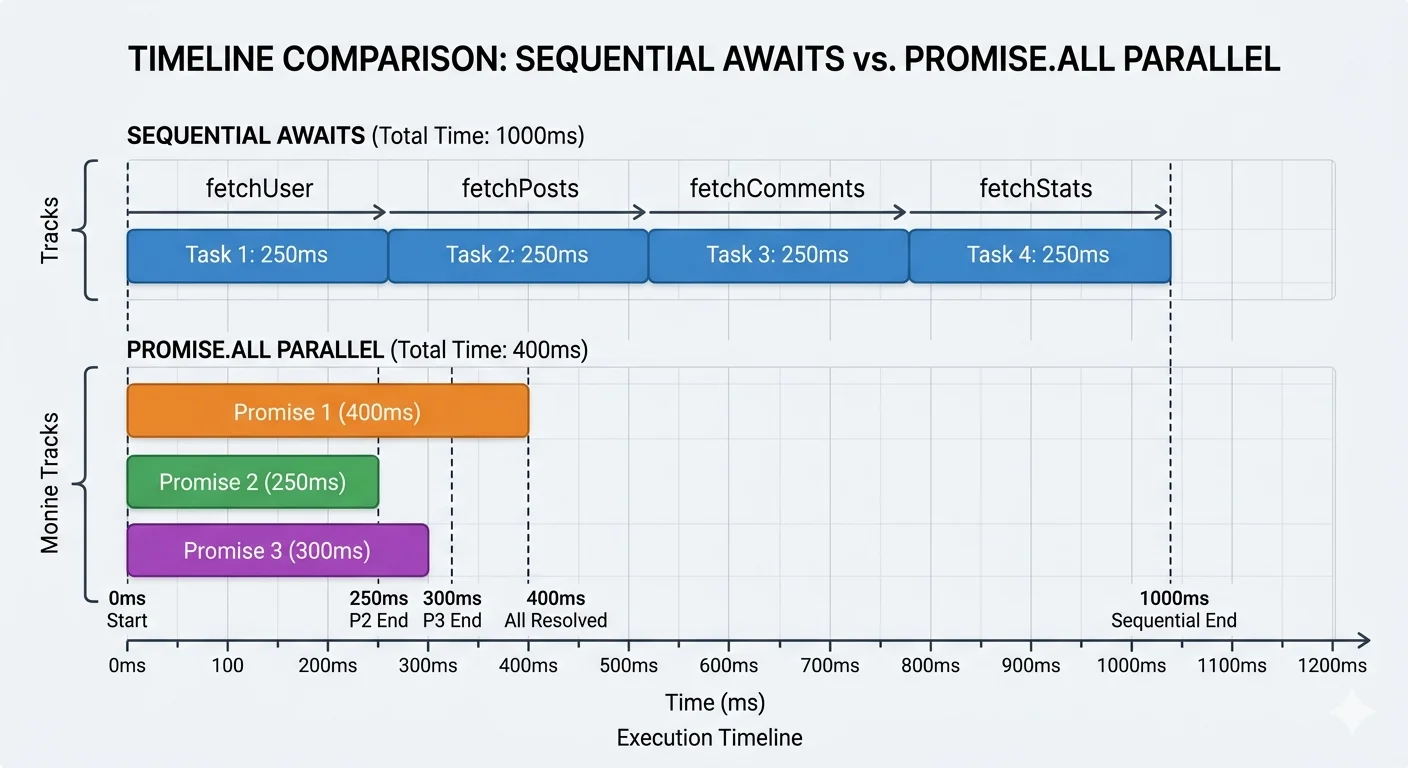
Sequential vs Parallel:重要的效能選擇
順序執行(慢)
const user = await fetchUser();
const posts = await fetchPosts();
const comments = await fetchComments();
// 總時間 = user + posts + comments
如果這三個獨立,順序跑很浪費。
並行執行(快)
const [user, posts, comments] = await Promise.all([
  fetchUser(),
  fetchPosts(),
  fetchComments(),
]);
// 總時間 = max(user, posts, comments)
什麼時候要順序
後一個請求依賴前一個結果:
const user = await fetchUser();
const posts = await fetchUserPosts(user.id);  // 需要 user.id
這種情況無法並行。
實戰 Checklist
-
fetch後檢查r.ok(HTTP 錯誤 fetch 不會 reject) -
try/catch包住 async 邏輯,錯誤至少 log - Event handler 的 async 用 try/catch,不然錯誤消失
- 生產環境監聽
unhandledrejection事件 - 獨立的 async 用
Promise.all並行 - 允許失敗的用
Promise.allSettled - Timeout 用
Promise.race+ setTimeout reject - React 元件卸載前用 AbortController 取消 fetch
相關文章
- Scope 與 Closure
- Event Loop — async 背後的調度
- JS 子 Roadmap
- Frontend Roadmap