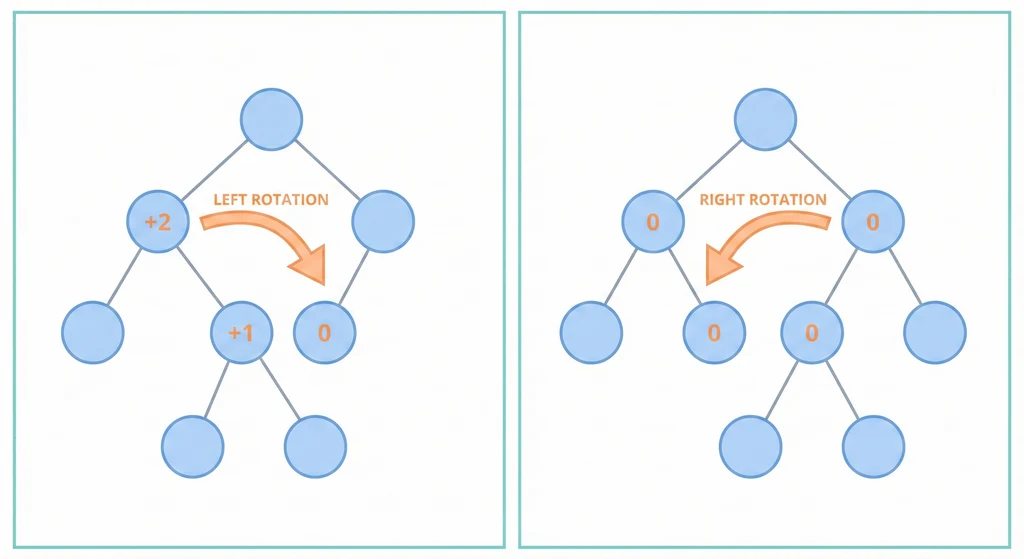
BST 退化成鏈表的問題,AVL Tree 用旋轉解決了——代價是每次插入刪除都要多做一點事。
先講結論
AVL Tree = BST + 自動平衡。嚴格保證左右子樹高度差不超過 1,所以搜尋、插入、刪除都是穩定的 O(log n),不會退化。讀多寫少的場景選 AVL,讀寫均衡選 Red-Black Tree。
為什麼 BST 需要平衡?
依序插入 1, 2, 3, 4, 5 到普通 BST:
1                    插到 AVL 裡:
 \
  2                      2
   \                    / \
    3       vs         1   4
     \                    / \
      4                  3   5
       \
        5

高度 5(鏈表)         高度 3(平衡)
左邊搜尋是 O(n),右邊是 O(log n)。差距在資料量大時非常可怕。
平衡因子
BF(節點) = 左子樹高度 - 右子樹高度
AVL 的鐵律:每個節點的 |BF| ⇐ 1。一旦違反,就觸發旋轉修復。
四種旋轉
不平衡只有四種型態,每種有對應的修復方式:
LL(左左)→ 右旋
      z                 y
     /                 / \
    y       →         x   z
   /
  x
RR(右右)→ 左旋
  z                     y
   \                   / \
    y       →         z   x
     \
      x
LR(左右)→ 先左旋再右旋
    z            z            x
   /            /            / \
  y    →       x    →       y   z
   \          /
    x        y
RL(右左)→ 先右旋再左旋
  z          z              x
   \          \            / \
    y  →       x   →      z   y
   /            \
  x              y
看起來複雜,但規律很明確:單邊偏就單旋,折彎就雙旋。寫 code 時其實就是判斷 BF 和子節點的 BF,然後 call 對應的旋轉函式。
插入流程
- 照正常 BST 規則插入
- 沿插入路徑往回更新每個節點的高度
- 檢查 BF,不平衡就旋轉
插入順序 10, 20, 30:

Step 1: 10       Step 2: 10        Step 3: RR 不平衡 → 左旋
                           \             10              20
                            20             \            /  \
                                            20   →    10   30
                                             \
                                              30
旋轉本身是 O(1)(只改幾個指標),整個插入過程是 O(log n)。
AVL vs Red-Black Tree
| AVL | Red-Black | |
|---|---|---|
| 平衡嚴格度 | 嚴格(BF ⇐ 1) | 寬鬆 |
| 搜尋 | 略快(更平衡) | 略慢 |
| 插入/刪除 | 旋轉次數較多 | 旋轉次數較少 |
| 適用場景 | 讀多寫少 | 讀寫均衡 |
| 實際使用 | 資料庫索引 | Java TreeMap/TreeSet、Linux kernel |
面試問到「為什麼 Java TreeMap 用 Red-Black Tree 不用 AVL Tree?」——因為 Map 通常插入刪除頻繁,Red-Black Tree 的旋轉開銷比較小。
但如果你的場景是「建好之後主要拿來查」(像資料庫索引),AVL Tree 更平衡所以搜尋更快。
AVL Tree 是完美主義者——每次操作都要確保自己完美平衡。Red-Black Tree 則是務實派,差不多就好。兩種都對,看你能接受多少不完美。